Phone Charging Slowly With Fast Charger? 9 Real Fixes
Your phone charging slowly with fast charger even though you bought an expensive 45W or 65W brick? You are not alone. I faced the same issue with my Samsung Galaxy…
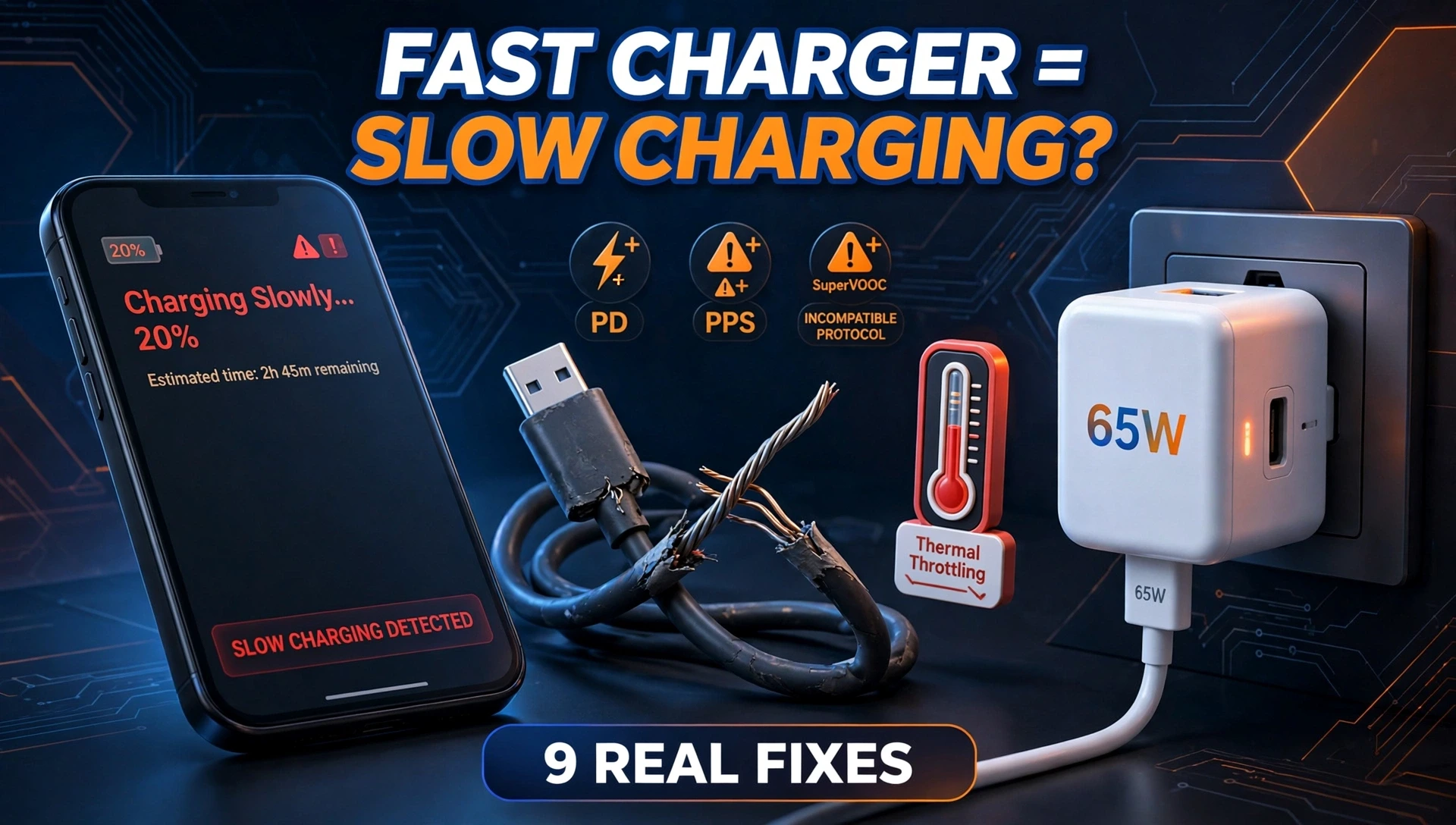
Your phone charging slowly with fast charger even though you bought an expensive 45W or 65W brick? You are not alone. I faced the same issue with my Samsung Galaxy S25 Ultra. A 25W charger and a 45W charger were giving me the exact same slow speed, almost 3 hours for a full charge.
The problem is rarely the charger itself. After testing different cables, bricks, and settings, I found that fast charging is controlled by three things: your phone’s settings, the charging protocol, and the cable quality. Let’s fix it step by step.
Why Is My Phone Charging Slowly With a Fast Charger?
A fast charger can only charge fast if everything in the chain supports it. If one part is weak, your phone automatically switches to slow charging to stay safe. This is why fast charging not working is so common.
1. The Hidden Fast Charging Toggle Is Off
This is the #1 reason I found, and the official brand pages don’t even mention it properly.
On Samsung, OnePlus, Xiaomi, and Vivo phones, there is a setting that can turn off fast charging.
How to check:
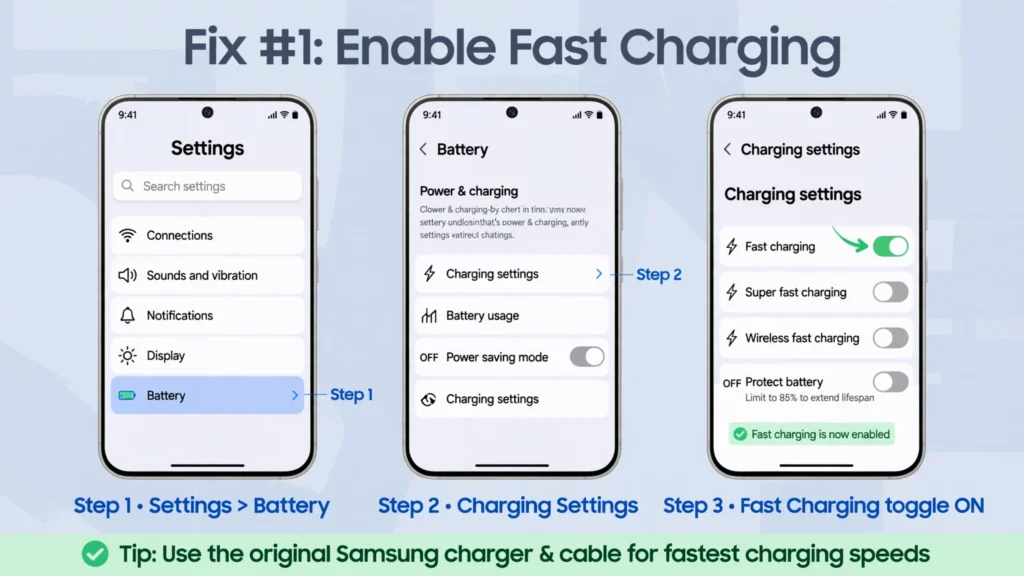
Go to Settings > Battery > Charging Settings and make sure Fast Charging and Super Fast Charging are turned ON. You must do this while your phone is NOT plugged in.
If this toggle is off, your phone will say “Charging” instead of “Fast Charging” on the lock screen, no matter how powerful your charger is. This one switch changed my charging time from 2 hours 50 minutes to just 57 minutes.
2. You Have an Incompatible Charging Protocol
This is the most technical reason, but also the most important. Not all fast chargers are the same.
An incompatible charging protocol means your charger and phone speak different languages.
- Samsung Galaxy needs PD with PPS for 45W Super Fast Charging 2.0
- OnePlus needs SuperVOOC / Warp Charge – it will only give you 80W or 100W with its original charger. If you use a normal 65W PD charger, it will slow down to 18W or 45W max.
- iPhone needs USB-PD
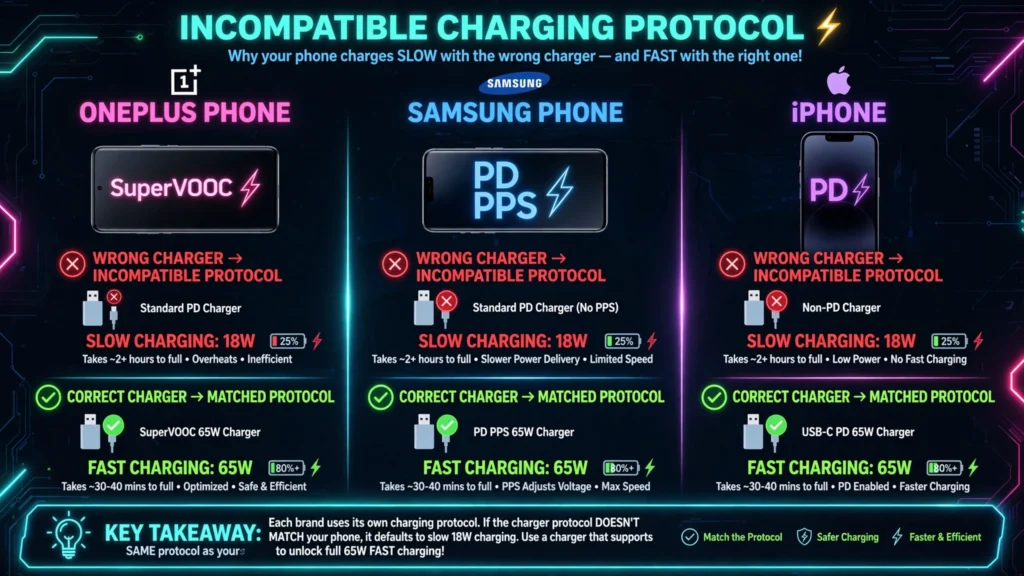
So, if you use a OnePlus 80W phone with a Samsung 45W PD charger, it will charge slowly. It’s not broken, it’s just incompatible. Always use the original charger or check that your third-party charger supports PPS.
3. You Are Using a Damaged Fast Charge Cable or Low-Amp Cable
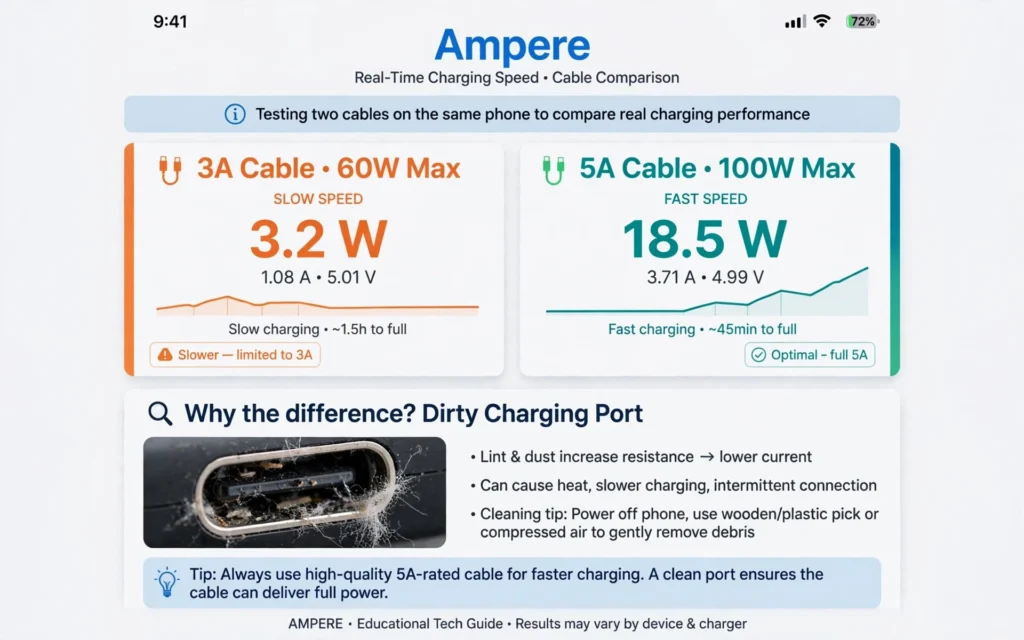
Your cable is more important than your brick. A damaged fast charge cable or a cheap cable can cut your speed by 70%.
Two problems happen:
- Physical Damage: Frayed ends, bent connectors, or lint in the cable stop full power delivery.
- Amp Rating: Look at the tiny text on your cable. If it says 3A, it can only carry up to 60W. You need a 5A (100W) cable for faster charging. Many 3A cables that come with older phones cannot handle new 65W+ chargers.
Try a different, certified 5A cable rated for 100W or 240W. It costs $8-$12 and often fixes the issue instantly.
4. Thermal Throttling Charging Speed is Active
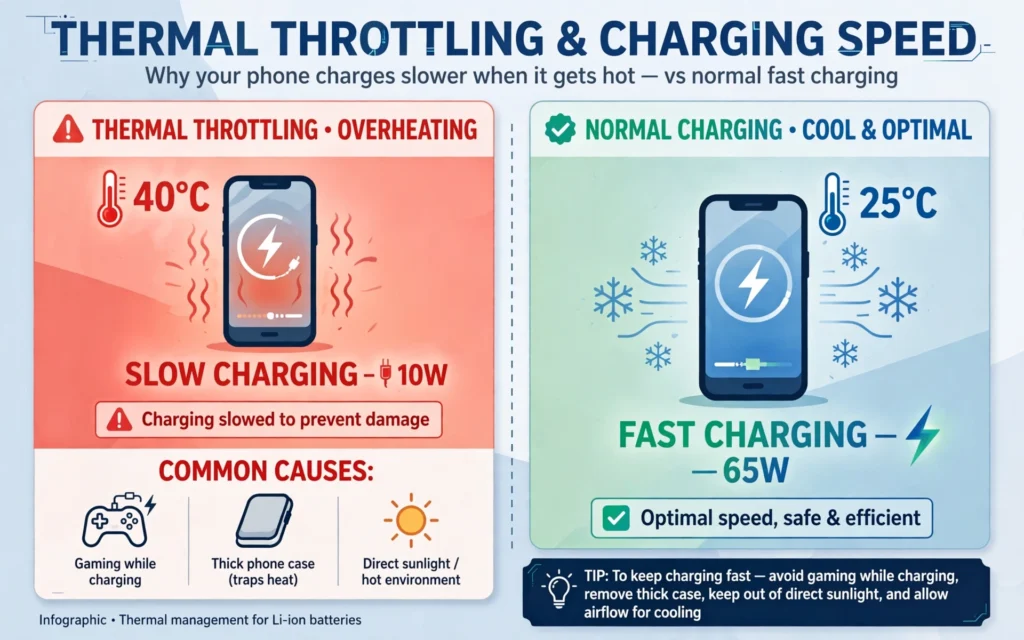
Is your phone hot? Thermal throttling charging speed is a safety feature. When your phone’s battery goes above 95°F (35°C), it deliberately slows down charging to prevent damage.
Common causes:
- Gaming or video calls while charging
- Charging under a pillow or in direct sunlight
- A thick phone case trapping heat
Remove the case, stop using the phone for 10 minutes, and charge in a cool room. You will see the fast charging speed come back.
5. Battery Protection Features Are Limiting Speed
Modern phones protect your battery on purpose:
Optimized Charging is ON
On iPhone and Samsung, if you charge overnight, the phone charges to 80% fast, then pauses until morning. This looks like slow charging.
80% Limit
OnePlus and Samsung have a setting to stop charging at 80% or 85% to make the battery last longer. Check Settings > Battery Health and turn it off if you need a full 100% fast charge.
6. Your Charging Port Is Dirty
Pocket lint and dust block the pins inside your USB-C port. Even a little dust prevents the phone and charger from making a proper fast-charge handshake.
Turn off your phone. Gently clean the port with a wooden toothpick or soft brush. Do not use metal. This 30-second fix solves fast charging issues for many people.
7. You Are Using Your Phone While Charging
Using GPS, YouTube, or games while plugged in uses power faster than the charger can add it. The net charging becomes slow. For the fastest test, turn on Airplane Mode and leave the phone alone for 15 minutes.
8. You Are Plugged Into a Low Power Source or Power Strip
Your fast charger needs full wall power. If you plug your 65W brick into a cheap extension cord, power strip, laptop USB port, or a power bank, it cannot deliver 65W. Those sources often give only 5W-12W. Always plug your fast charger directly into a wall socket for full speed.
9. Your Phone Software Is Outdated
An old software bug can cause fast charging not working. Samsung and OnePlus fix charging handshake bugs with updates. Go to Settings > Software Update > Download and Install. An update from last month fixed slow charging issues for many Galaxy S24 and OnePlus 12 users.
How to Check Your Real Charging Speed
Don’t trust the “Fast Charging” text. Check the real watts.
- Install a free app like Ampere or AccuBattery.
- Plug in your charger.
- If you see less than 15W on a 45W charger, something is wrong.
A healthy fast charging speed should show:
- 0% to 50% in about 20-30 minutes for a 45W-65W phone
- 0% to 100% in 60-75 minutes
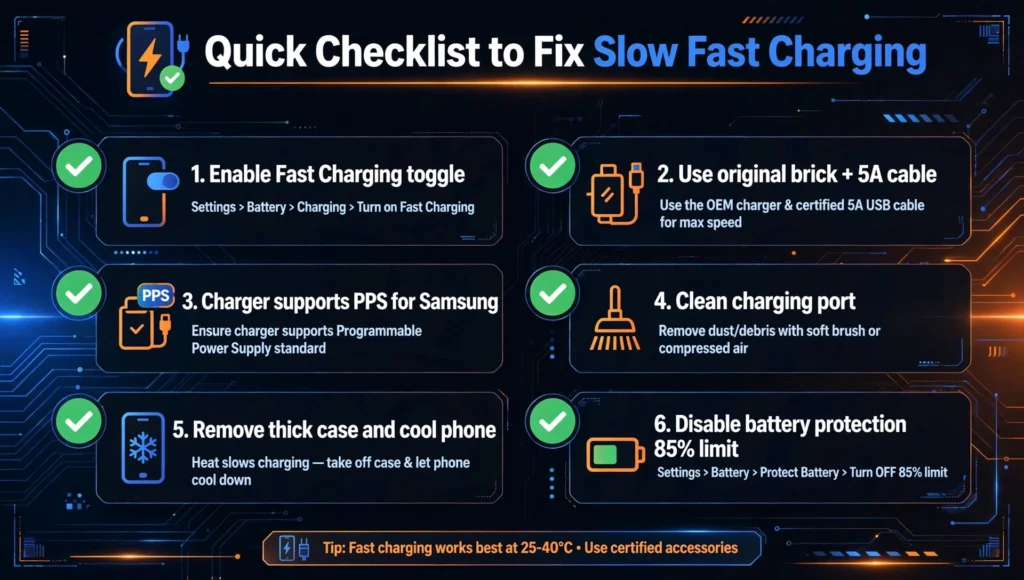
Quick Checklist to Fix Slow Fast Charging
- Enable Fast Charging toggle in Settings.
- Use original brick + 5A certified cable.
- Make sure charger supports PPS if you have a Samsung.
- Clean your charging port.
- Remove thick case and cool down the phone.
- Disable battery protection / 85% limit temporarily.
Conclusion
So if your phone charging slowly with fast charger is frustrating you, remember it’s almost never a broken phone. In 90% of cases, fast charging not working is due to a hidden setting, an incompatible charging protocol, or a damaged fast charge cable.
Before you buy a new charger, do the settings check, test with a 5A cable, and watch for thermal throttling charging speed. That alone will save you $30-$50 and bring back your true fast charging speed.
FAQs – Phone Charging Slowly With Fast Charger
Why does my phone say “fast charging” but still charges slowly?
This is thermal throttling charging speed. Your phone shows fast charging but limits power to 10-15W after 70% or when hot to protect the battery. Cool your phone to fix it.
My fast charger switches between fast charging and cable charging – why?
This happens due to a damaged fast charge cable or loose port connection. The phone keeps disconnecting the fast charging handshake. Clean your port and try a new 5A certified cable.
Does using a 3A cable instead of 5A make my 45W charger slow?
Yes, absolutely. A 3A cable can only carry 60W max and often less. For 45W Super Fast Charging you need a 5A cable with PPS support, otherwise it will charge slowly.
Fast charging toggle is ON but still slow charging – what to do?
Check for incompatible charging protocol. Your Samsung needs PD with PPS, OnePlus needs SuperVOOC. Also check if Optimized Charging or 85% battery limit is ON in settings.
Is it safe to use 100W charger on 25W phone? Will it cause slow charging?
Yes, it is safe. Your phone only takes 25W. It will not cause slow charging, but it will not charge faster than 25W either. The phone controls the speed, not the brick.
Phone charges fast till 50% then becomes slow – is it normal?
Yes, this is completely normal. All phones charge fastest from 0-50%. After 50-80% they slow down due to thermal throttling charging speed and battery protection to increase battery lifespan.
Can dust in charging port stop fast charging?
Yes. Dust and lint block the fast charging pins. Your phone fails to detect the fast charger and falls back to slow 5W charging. Clean the port gently with a wooden toothpick.
Why does my phone say fast charging but still charging slowly?
This is usually thermal throttling. Your phone shows fast charging but slows down to 10W-15W to control heat after 70-80%. Cool down your phone and remove the case to restore full speed.
Can a damaged fast charge cable cause slow charging with fast charger?
Yes. A damaged or 3A-rated cable can’t carry enough current. Even with a 65W brick, a bad cable limits you to 10W-18W slow charging. Use a certified 5A cable.
What is an incompatible charging protocol?
It means your charger uses PD while your OnePlus needs SuperVOOC. The phone then falls back to slow PD charging at 18W-45W instead of its full 80W speed. Use original charger.
My Samsung fast charging toggle is ON but still slow. Why?
Your cable might be 3A only, or you use a charger without PPS support. Samsung 45W fast charging needs a PD charger with PPS and a 5A cable to hit full speed.
Does thermal throttling charging speed damage my battery?
No, it protects it. Your phone slows charging when hot to prevent battery damage. It is normal for charging to get slower after 80% or in hot environments.