9850X3D PBO Gaming Performance: The Ultimate Guide to Safe +200MHz Boost Gains
If you’re researching 9850X3D PBO gaming performance, you’ve probably already seen the headline number: AMD’s Ryzen 7 9850X3D boosts up to 5.85GHz, a jump over the 9800X3D’s 5.65GHz ceiling. What…
If you’re researching 9850X3D PBO gaming performance, you’ve probably already seen the headline number: AMD’s Ryzen 7 9850X3D boosts up to 5.85GHz, a jump over the 9800X3D’s 5.65GHz ceiling. What most coverage skips is what that clock advantage actually costs in voltage and heat, and whether Precision Boost Overdrive changes the calculation. This article pulls that together the settings, the trade-offs, and a straight answer on whether tuning PBO on the 9850X3D is worth the effort for gaming.
What PBO Does on the 9850X3D
Precision Boost Overdrive isn’t an overclock in the traditional sense it doesn’t lock a fixed frequency. Instead, it raises the power, current, and thermal ceilings (PPT, TDC, EDC) the chip is allowed to use, letting the built-in boost algorithm push higher and hold boost clocks longer whenever thermal headroom allows. On the 9850X3D, the two levers that matter most for 9850X3D PBO gaming performance are:
- PBO mode: Advanced (auto limits, safest) vs Manual (you set PPT/TDC/EDC yourself)
- Max Boost Override: a +200MHz ceiling extension, which is where nearly all the extra frequency headroom comes from
Enabling PBO alone with no override barely moves the needle for this chip. The override is the setting that actually matters.
Stock vs. PBO Clock Behavior
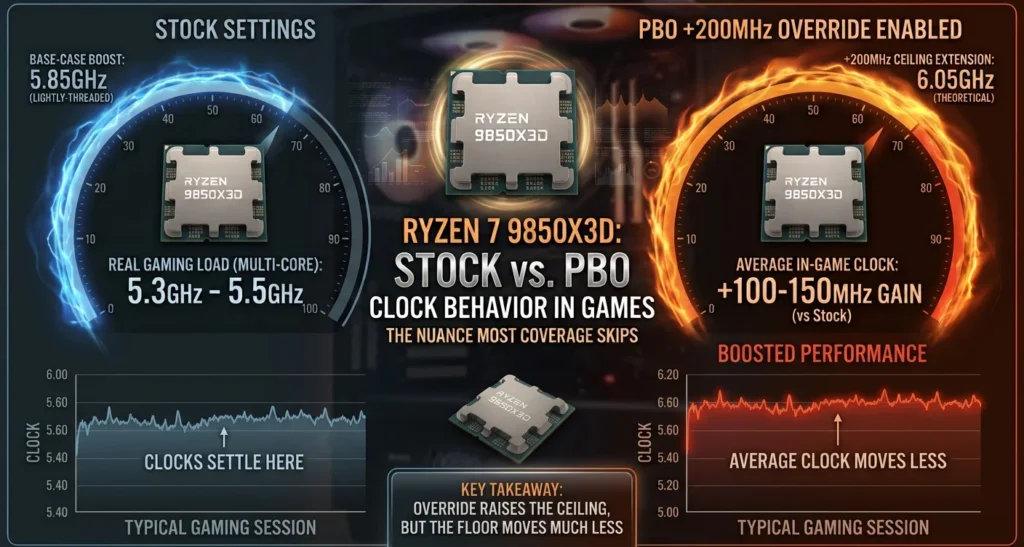
Out of the box, the 9850X3D’s 5.85GHz rating is a best-case, lightly-threaded number — in real gaming loads across multiple cores, clocks typically settle into the 5.3–5.5GHz range depending on the title and cooling. With PBO’s +200MHz override enabled, the ceiling extends further, but the average in-game clock rarely moves more than 100–150MHz, because most games simply don’t sustain the kind of light, bursty thread pattern that lets the boost algorithm reach for maximum frequency.
That’s the core nuance missing from a lot of “PBO gaming performance” discussion: the override raises the ceiling, but the floor what the chip actually runs at during a typical gaming session moves much less.
Voltage and Thermal Behavior Under PBO
This is where the 9850X3D behaves differently from its siblings. Because it’s a higher binned die, community voltage logging under PBO+200 has shown VDDCR_VDD spiking as high as 1.30–1.35V during gaming transients on Advanced/Motherboard PBO limits noticeably higher than what a well-binned 9800X3D typically needs to hit similar clocks. Higher voltage under boost means:
- Higher transient power draw (even if average power looks similar to stock)
- More thermal spikes during CPU-bound moments (menu loads, shader compilation, open-world traversal)
- A higher chance of hitting thermal throttling on average air coolers during long sessions
If your voltage under PBO is consistently sitting above ~1.3V, that’s normal for this chip’s boost behavior but it’s also the reason manual PBO limits (below) tend to outperform “just enable PBO and walk away.”
Best Settings for 9850X3D PBO Gaming Performance
There isn’t one universal answer, since motherboard VRM design, cooler capacity, and silicon quality all shift the ideal numbers. But three approaches consistently show up as effective across owner reports and reviewer testing.
Option 1: The Simple Approach (Advanced PBO + Boost Override)
For most gamers, this is the best effort-to-reward ratio:
- Set PBO to Advanced
- Set Max CPU Boost Clock Override to +200MHz
- Leave PPT/TDC/EDC on motherboard defaults
- Enable EXPO/XMP for your RAM
This alone recovers most of the available gaming uplift without touching voltage curves, and it’s fully reversible from BIOS in seconds.
Option 2: Manual PBO Limits + Curve Optimizer (Best Balance)
For anyone chasing lower temps and stable clocks (9850X3D PBO gaming performance) which matters more for 1% lows than raw average FPS manual limits with a negative Curve Optimizer offset perform better than “auto everything”:
| Setting | Typical Range |
| PBO Limits | Manual |
| PPT | 150–170W |
| TDC | 110–130A |
| EDC | 170–200A |
| Curve Optimizer (all-core) | -10 to -20 |
| Boost Override | +200MHz |
| Scalar | Auto or 1x |
This configuration tends to hold clocks more consistently than letting the motherboard apply unrestricted limits, because it caps the transient voltage spikes that cause clock stretching (9850X3D PBO gaming performance) the same clock instability that shows up as inconsistent frame pacing rather than raw FPS loss.
RAM and Infinity Fabric: Don’t Skip This
A large share of “9850X3D PBO gaming performance” questions online focus entirely on core settings and ignore memory tuning, which is a mistake on any X3D chip. For gaming specifically:
- Run RAM at 1:1 with Infinity Fabric Clock (FCLK) wherever possible — typically DDR5-6000 with FCLK around 2000–2067MHz is the sweet spot for AM5 boards.
- Tightening primary/secondary timings (CL, tRFC, tRCDRD) usually delivers a bigger 1% low improvement than chasing another 100MHz of CPU boost override.
- Going above 1:1 FCLK ratios (e.g., DDR5-8000 in 2:1 mode) generally hurts gaming latency on X3D chips, even though it looks better in synthetic memory benchmarks.
9850X3D vs. 9800X3D: Does PBO Close the Gap?
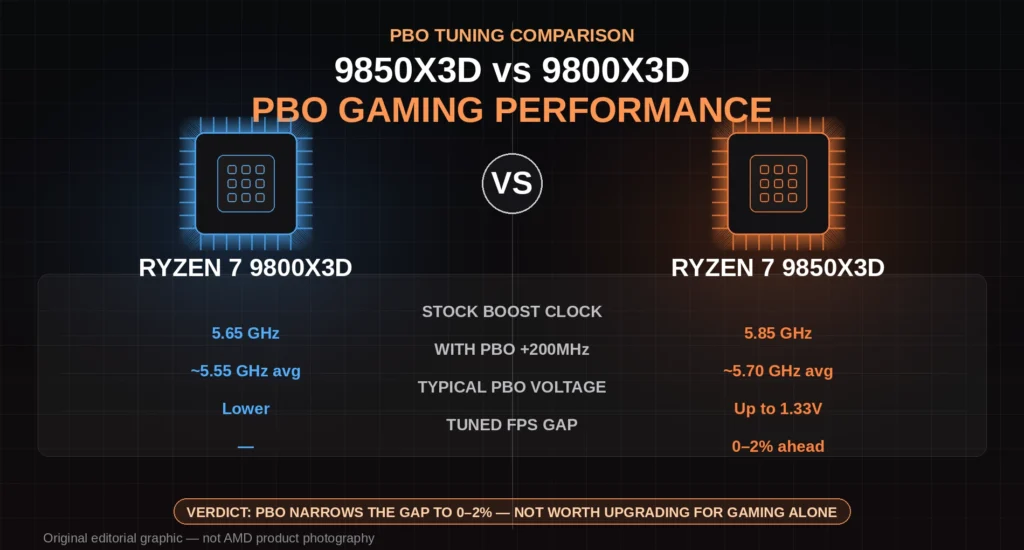
This is the question driving most searches around 9850X3D PBO gaming performance is the 9850X3D’s higher stock clock still meaningfully ahead once both chips are tuned?
The honest answer: it narrows sharply, but doesn’t fully disappear.
- Stock-to-stock, the 9850X3D’s clock advantage translates to roughly a low-single-digit percentage FPS lead in most titles real, but not transformative.
- Once both chips run PBO +200 with similar cooling, the gap typically shrinks to somewhere between 0–2%, with plenty of overlap depending on silicon lottery and title.
- Where the 9850X3D still pulls ahead is consistency at the top end it holds higher clocks for longer under sustained load and generally needs less voltage to get there, which matters more for long sessions and heavier CPU-bound titles (simulation games, MMOs, strategy titles) than for GPU-bound AAA titles at higher resolutions.
If you already own a 9800X3D (9850X3D PBO gaming performance) , tuning PBO is very likely to get you close enough that upgrading isn’t worth it for gaming alone. If you’re buying new and the price gap is small, the 9850X3D’s headroom and lower required voltage for the same clocks make it the safer long-term pick — especially if you plan to run PBO daily rather than at stock.
Is Tuning PBO on the 9850X3D Worth It?
For gaming specifically: yes, but with realistic expectations. The +200MHz override plus a modest manual PBO/Curve Optimizer profile typically nets a 2–5% average FPS gain and a larger improvement to 1% lows, which is what actually feels smoother during gameplay. Chasing more aggressive voltage or higher boost overrides tends to hit diminishing returns fast, while pushing temperatures and power draw up disproportionately.
FAQs: 9850X3D PBO Gaming Performance
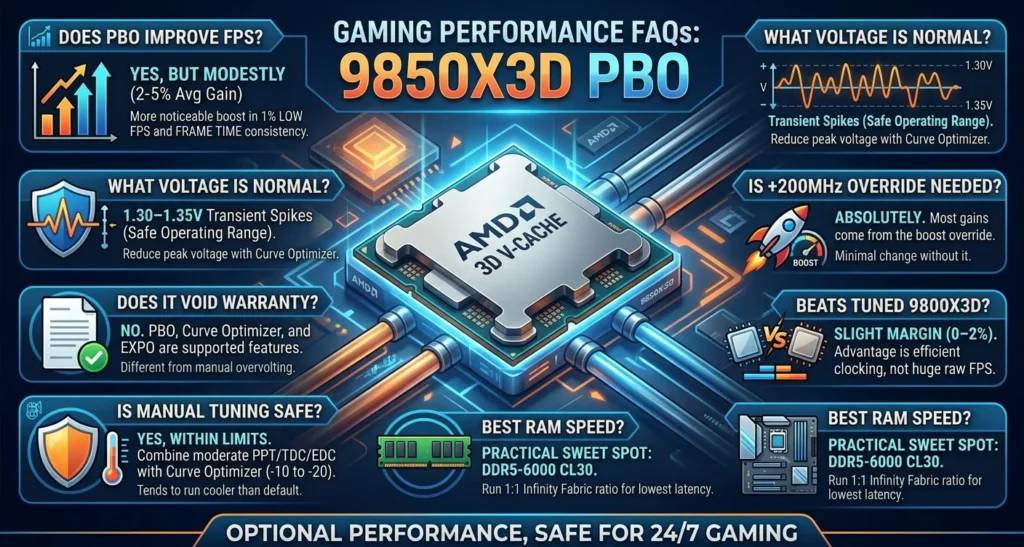
Does PBO actually improve gaming FPS on the 9850X3D?
Yes, but modestly. Expect roughly 2–5% average FPS gains from PBO +200MHz with tuned limits, with a larger, more noticeable improvement in 1% low frame rates and frame time consistency.
What voltage is normal for the 9850X3D under PBO?
Transient voltage spikes up to around 1.30–1.35V during gaming are commonly reported with PBO enabled and motherboard-default limits. This is within AMD’s safe operating range for short transients, though manual PPT/TDC/EDC limits combined with a negative Curve Optimizer offset can reduce peak voltage while keeping similar clocks.
Is the +200MHz boost override necessary, or does PBO alone help?
The boost override is doing almost all the work. Enabling PBO without the +200MHz override produces minimal gaming performance change on this chip.
Does the 9850X3D beat a tuned 9800X3D in gaming?
By a small margin, typically 0–2% once both chips are running PBO +200 with similar cooling and RAM tuning. The 9850X3D’s advantage is more about reaching its top clocks with lower voltage than about a large raw FPS lead.
What RAM speed is best for 9850X3D gaming performance?
DDR5-6000 CL30 at a 1:1 Infinity Fabric ratio is generally the practical sweet spot. Going faster in a 2:1 mode usually increases latency and can hurt gaming performance despite higher bandwidth numbers.
Is manual PBO tuning safe for daily gaming use?
Yes, within AMD’s normal PBO voltage and thermal limits. Manual PPT/TDC/EDC limits paired with a conservative Curve Optimizer offset (around -10 to -20) are widely used for 24/7 gaming setups and tend to run cooler than default “Advanced” PBO with unrestricted motherboard limits.
Does PBO void the 9850X3D’s warranty?
No. AMD’s official position is that PBO (9850X3D PBO gaming performance) , Curve Optimizer, and EXPO/XMP memory profiles are supported features and do not void the CPU warranty, unlike manual voltage overclocking outside PBO.