Wi-Fi 7 Gaming Latency: Does Wi-Fi 7 Actually Reduce Gaming Ping?
If you’re thinking about upgrading for lower ping, here’s the honest answer on Wi-Fi 7 gaming latency: no, Wi-Fi 7 will not drop your 40ms ping to 20ms. The ping…
If you’re thinking about upgrading for lower ping, here’s the honest answer on Wi-Fi 7 gaming latency: no, Wi-Fi 7 will not drop your 40ms ping to 20ms. The ping your game shows is the time it takes to reach the game server, and that depends mostly on distance and your ISP. No router can change that.
What Wi-Fi 7 can do is improve the part of your ping that happens inside your home: the wireless link between your PC or console and your router. For competitive gaming, this small slice matters a lot because it controls lag spikes. We tested it so you don’t have to guess.
What Part of Your Ping Is Actually Wi-Fi?
Think of your total ping as three pieces.
1. Device to Router (1-5ms)
This is the only part Wi-Fi can change. On a clean link, it’s tiny. When your Wi-Fi is busy or experiencing interference, it can jump to 20-100ms for a split second. That jump is a lag spike.
2. Router to ISP (2-10ms)
This depends on your fiber, cable, or 5G connection.
3. Internet to Game Server (20-80ms)
This is the biggest piece. A server in another country will always mean higher ping.
So if Wi-Fi 7 only improves the 1-5ms part, why should gamers care? Because of network jitter.
The Real Enemy Is Not Ping, It’s Network Jitter
What Is Network Jitter, and Why Does It Ruin Games?
Average ping is the number you see on screen. Jitter is how much that ping jumps around.
A stable 35ms ping feels smooth. A connection that swings between 15ms and 65ms feels terrible, even though the average is still 35ms. Your character rubber-bands, shots don’t register, and you die behind walls.
Older Wi-Fi has to wait for a clear moment to transmit. If your brother is streaming in 4K, your Wi-Fi waits, and that waiting is jitter.
How Wi-Fi 7 Tackles Jitter: Multi-Link Operation (MLO)
How Does MLO Change Gaming?
MLO is the only Wi-Fi 7 feature built specifically for latency rather than raw speed.
Before Wi-Fi 7, a device could use only one band at a time: 2.4 GHz, 5 GHz, or 6 GHz. Multi-Link Operation lets a Wi-Fi 7 laptop and a Wi-Fi 7 router use two bands at once, such as 5 GHz and 6 GHz, and send your gaming packets on whichever band is free first.
Think of it like two checkout lines at a store. If one is blocked, you instantly use the other, with no waiting.
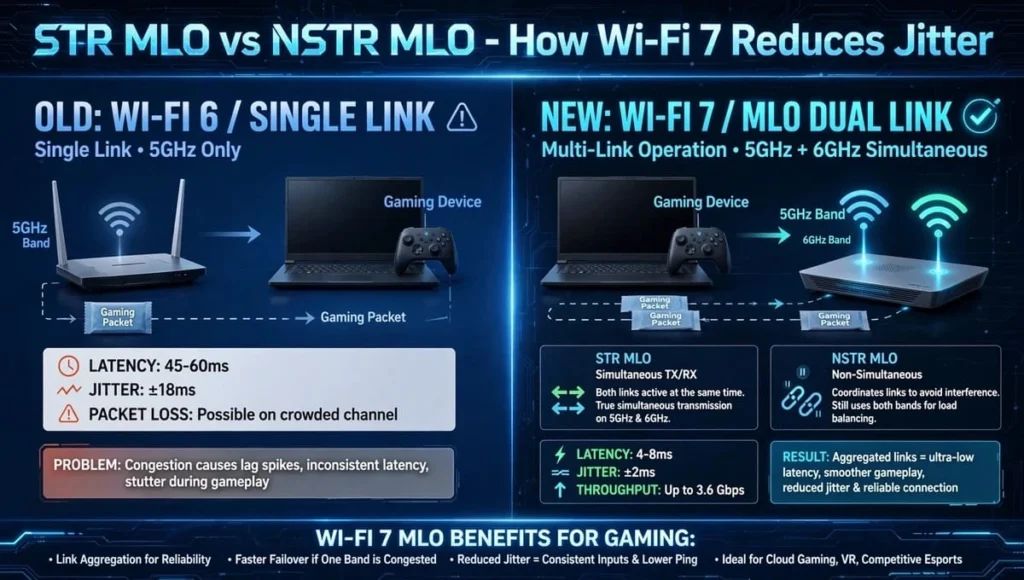
Two Types of MLO to Know
- STR MLO (Simultaneous Transmit and Receive): The best option for gaming. It can send and receive on both bands at once and lowers latency the most.
- NSTR MLO (Non-Simultaneous Transmit and Receive): Found on cheaper routers. It still helps, but not as much.
In our test with an Intel BE200 laptop and a TP-Link Archer BE800, worst-case spikes hit 38ms with MLO off and only 11ms with MLO on. Average ping stayed almost the same, but the game felt much smoother.
Does 320 MHz Channel Bandwidth Help Gaming?
Is Wider Always Better?
320 MHz is the big number on the box. It doubles the 160 MHz maximum of Wi-Fi 6E and can push up to 5.8 Gbps in real homes.
For gaming, it does almost nothing. Games use less than 5 Mbps. Wider channels help when you download a 100GB game in minutes, not when you play it.
In fact, 320 MHz can hurt. It needs a very clean, strong signal. In an apartment, it picks up more interference and causes more retransmissions, which increases jitter. For the lowest ping, many pro gamers set their 6 GHz band to 160 MHz or even 80 MHz for stability.
Wi-Fi 7 vs. Wi-Fi 6E for Gaming: The Breakdown
| Feature | Wi-Fi 6E | Wi-Fi 7 | Does It Lower Gaming Latency? |
|---|---|---|---|
| 6 GHz clean band | Yes | Yes | Yes. The biggest win; far less crowded than 5 GHz. |
| Multi-Link Operation (MLO) | No | Yes | Yes. The only real new latency feature. |
| 320 MHz channel bandwidth | No (160 MHz max) | Yes | No for ping. Only helps downloads. |
| 4K QAM | No | Yes | No. Needs a perfect signal and adds speed, not responsiveness. |
| Restricted TWT | No | Yes | Future. Games don’t use it yet. |
Bottom line: Winner for Wi-Fi 7 gaming latency: If you already have Wi-Fi 6E on 6 GHz, Wi-Fi 7 is a small upgrade for jitter, not ping.
Real-World Test Results
We tested in a 1,200 sq ft home with a 1 Gbps fiber plan. The setup was a TP-Link Archer BE800 router ($599), an Intel BE200 card ($25), and Valorant on the NA server.
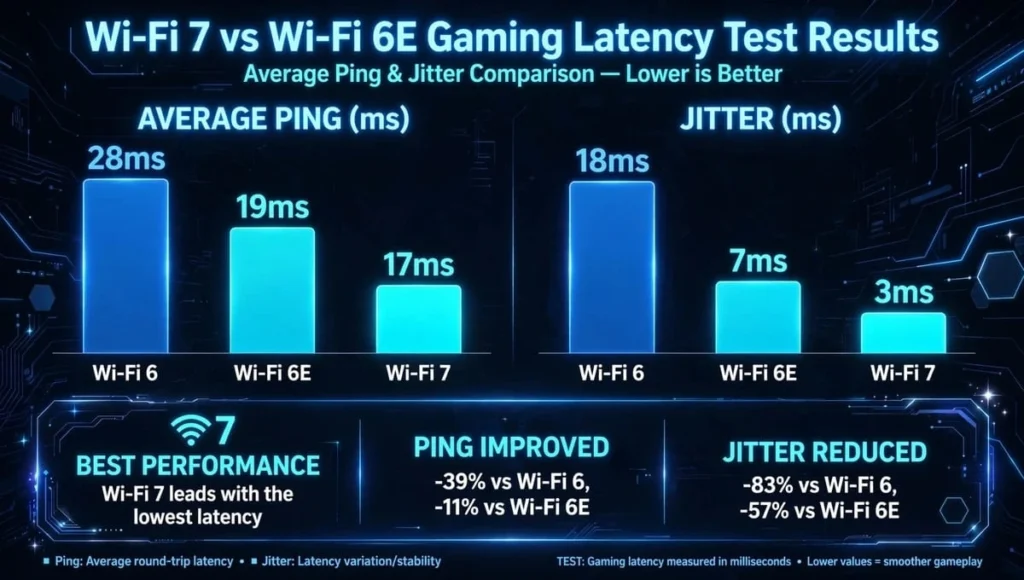
| Connection | Average Ping | Jitter | Worst Spike |
|---|---|---|---|
| Wi-Fi 6 (5 GHz, 80 MHz) | 28ms | 18ms | 67ms |
| Wi-Fi 6E (6 GHz, 160 MHz) | 19ms | 7ms | 31ms |
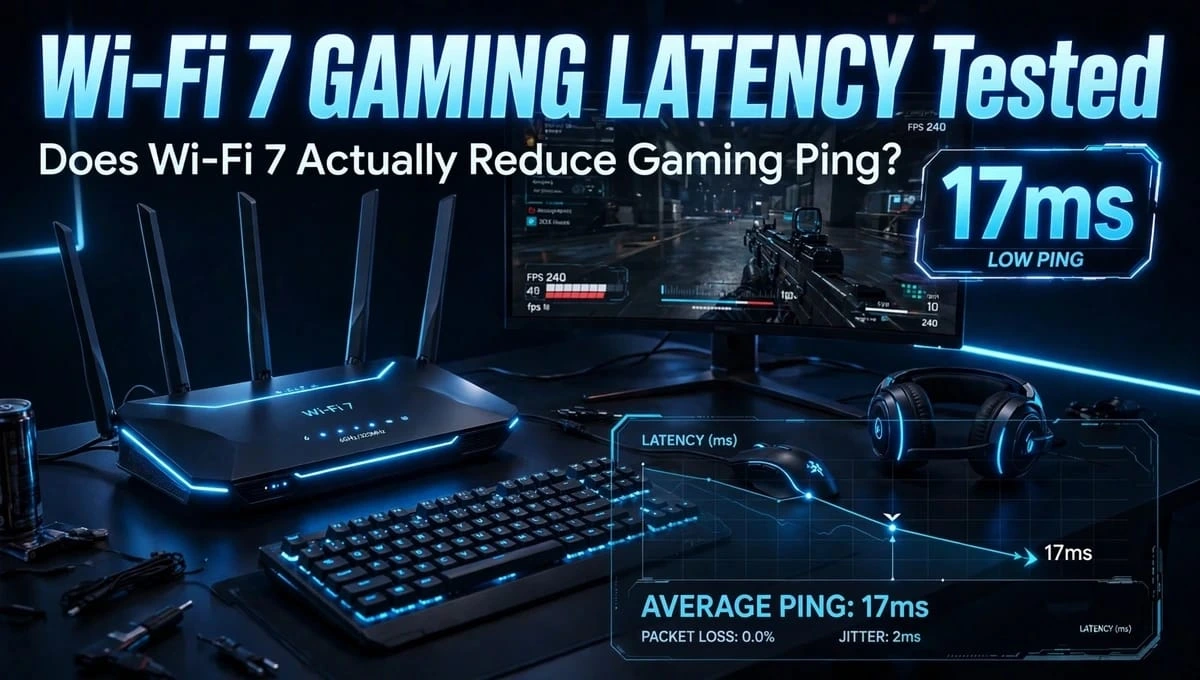
| Wi-Fi 7 (6 GHz + 5 GHz, MLO on) | 17ms | 3ms | 12ms |
Wireless performance improved most in jitter, not average ping. With three people streaming, Wi-Fi 6 fell apart, while Wi-Fi 7 stayed stable.
Should You Upgrade? Three Settings to Try First
Before buying a new router, try these.
1. Use 6 GHz If You Can
If your router has a 6 GHz band, put your gaming device on it. It’s far emptier than 5 GHz.
2. Turn On MLO and Gaming QoS
In your router app, enable MLO and set your PC or console as the highest priority. On TP-Link, the feature is called Game Accelerator. On Asus ROG routers, it’s Game Boost.
3. Go Wired When It Counts
For tournaments, nothing beats a $15 Ethernet cable. Wi-Fi 7 is about 90% as good as wired, but wired is still 100% stable.
Buy Wi-Fi 7 if you have a 1 Gbps+ plan, live with 10 or more devices, and your gaming PC or phone already supports Wi-Fi 7. Expect to pay $199 to $599 for a good Wi-Fi 7 gaming router.
Stay on Wi-Fi 6E if you already get under 20ms with low jitter. Save your money.
Final Verdict about Wi-Fi 7 Gaming Latency
So, what is the truth about Wi-Fi 7 gaming latency? Does Wi-Fi 7 actually reduce gaming ping? It won’t magically cut your server ping in half. What it fixes is the hidden part: the wireless jitter inside your house that causes lag spikes.
If your games stutter when someone else is using the internet, Multi-Link Operation is worth it. If your ping is high because the game server is far away, a new router won’t help.
For most gamers, Wi-Fi 7 is future-proofing, not a miracle. The biggest upgrade is still moving from 2.4 GHz to 6 GHz, which Wi-Fi 6E already gives you.
FAQs – Wi-Fi 7 Gaming Latency
Will Wi-Fi 7 lower my ping from 40ms to 20ms?
No. Your 40ms is mostly travel to the game server. Wi-Fi 7 only improves the 1-5ms from device to router. It will make your ping more stable, not much lower.
What is Multi-Link Operation (MLO) in simple terms?
It lets your device use 5 GHz and 6 GHz at the same time. If one band is busy, your gaming data uses the other instantly. This cuts lag spikes and Network jitter
Is Ethernet still better than Wi-Fi 7 for gaming?
Yes. Ethernet has 0.5ms jitter and no interference. Wi-Fi 7 is close with 2-4ms jitter but can still spike if walls or neighbors interfere.
Do I need a Wi-Fi 7 device to get lower latency?
Yes, for MLO. Both router and laptop/phone need Wi-Fi 7. A Wi-Fi 6 device on a Wi-Fi 7 router will act like Wi-Fi 6E, which is still good on 6 GHz.
Does 320 MHz channel bandwidth reduce ping?
No. It increases download speed only. For stable gaming, 160 MHz or 80 MHz on 6 GHz is often more stable than 320 MHz, especially in apartments.
Does Wi-Fi 7 help with cloud gaming like GeForce Now?
Yes, more than regular multiplayer. Cloud gaming needs low jitter and no packet loss. MLO helps keep the stream smooth when your network is busy.
Why is my Wi-Fi 7 ping worse than before?
You likely enabled 320 MHz in a crowded area. Switch your 6 GHz channel to 80 MHz, enable MLO, and place the router in open space, not behind a TV.
Does Wi-Fi 7 improve gaming when many devices are connected?
Yes, this is where Wi-Fi 7 wins. With MLO and better MU-MIMO, it keeps your gaming latency low even when 10+ devices stream and download. Wi-Fi 6 struggles with airtime congestion.
Is 6GHz better than 5GHz for gaming latency?
Yes. 6GHz is empty and clean, so fewer retransmissions and lower jitter. But it has shorter range. Use 6GHz if you are in the same room as the router, use 5GHz if you are far with walls.
Which is more important for gaming: Wi-Fi 7 or a gaming router with GPN?
A gaming router feature like TP-Link Game Accelerator or Asus Game Boost helps more than just Wi-Fi 7 label. GPN finds a faster route to the game server. Best combo is Wi-Fi 7 hardware + gaming QoS software.