Smart Home Automation Devices: Simple Beginner’s Guide
Imagine walking into a dark room and the lights turn on by themselves. Your fan slows down when the room cools off, and your front door locks itself when you…
Imagine walking into a dark room and the lights turn on by themselves. Your fan slows down when the room cools off, and your front door locks itself when you leave. That is what smart home automation devices can do. They are everyday gadgets, like bulbs, plugs, switches, sensors and cameras, that connect to the internet or a small wireless network and follow your rules. The hard part is not the idea. It is knowing what to buy, what works together, and what can go wrong. This guide answers those questions in plain words.
What Are Smart Home Automation Devices?
Smart home automation devices are normal home items that have a tiny computer and a wireless chip inside. You control them from a phone app, a voice assistant, or a wall panel. Better still, you can make them act on their own.
There is a big difference between smart and automated:
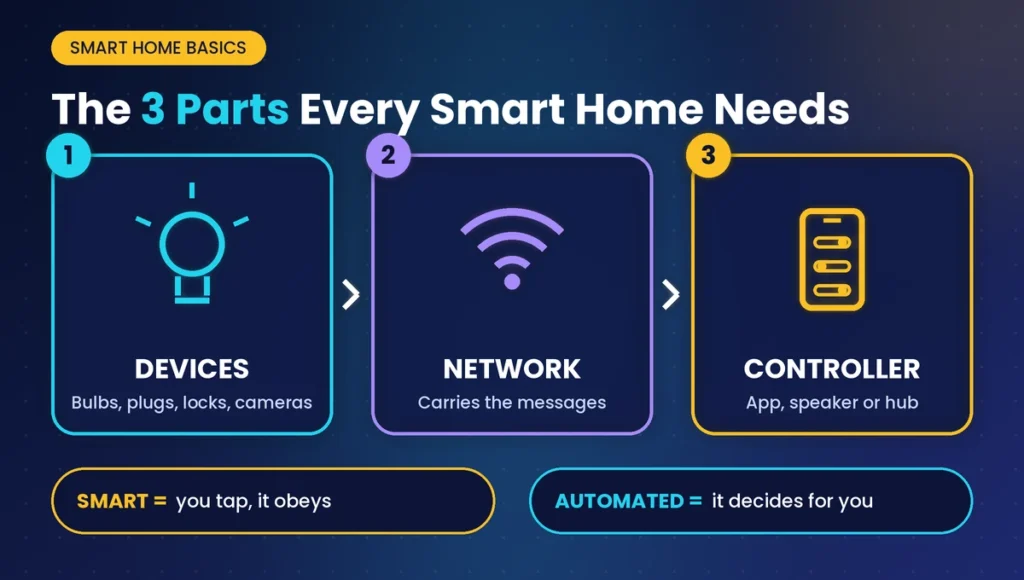
- Smart means you can control something from your phone. You tap a button and the light turns on.
- Automated means the device decides for you. The light turns on when it senses you walking in.
Many beginners buy smart gadgets and never automate anything. The real magic starts when you set up rules.
The Three Parts Every Smart Home Needs
Every setup, big or small, has the same three parts:
- Devices: the things that do the work, such as bulbs, plugs, locks and cameras.
- A network: the invisible wireless path that carries messages.
- A controller: the brain that gives orders. It can be your phone app, a smart speaker, or a dedicated hub.
If one part is weak, the whole system feels annoying. That is why planning matters more than shopping.
The Main Types of Smart Home Automation Devices
You do not need all of these. Start with the one that solves your biggest daily annoyance.
Smart Lighting and Switches
Smart bulbs change brightness and color. Smart switches go inside the wall and control the lights you already have. Switches are often the better choice because anyone can still use the wall button, even guests who do not have the app.
Smart Plugs and Power Controllers
A smart plug sits between the wall socket and an appliance. It lets you switch that appliance on a schedule. Many plugs can also show how much electricity something uses. Heavy appliances like water heaters need a device rated for that power, so always check the number printed on the product.
Sensors
Sensors are the quiet heroes. A motion sensor can turn on a hallway light. A door sensor can warn you when a door opens. A water-leak sensor can warn you before a small drip becomes a flooded floor. A temperature sensor can start a fan or heater.
Cameras, Video Doorbells and Smart Locks
These devices help with safety. A video doorbell shows who is at the door. A smart lock lets you open the door with a code or fingerprint, and you can lock it again from anywhere.
Climate, Cleaning and Comfort Devices
Smart thermostats, air purifiers, robot vacuums and motorized blinds save time and effort. They are nice extras, so add them after the basics work well.
How Do Smart Home Automation Devices Talk to Each Other?
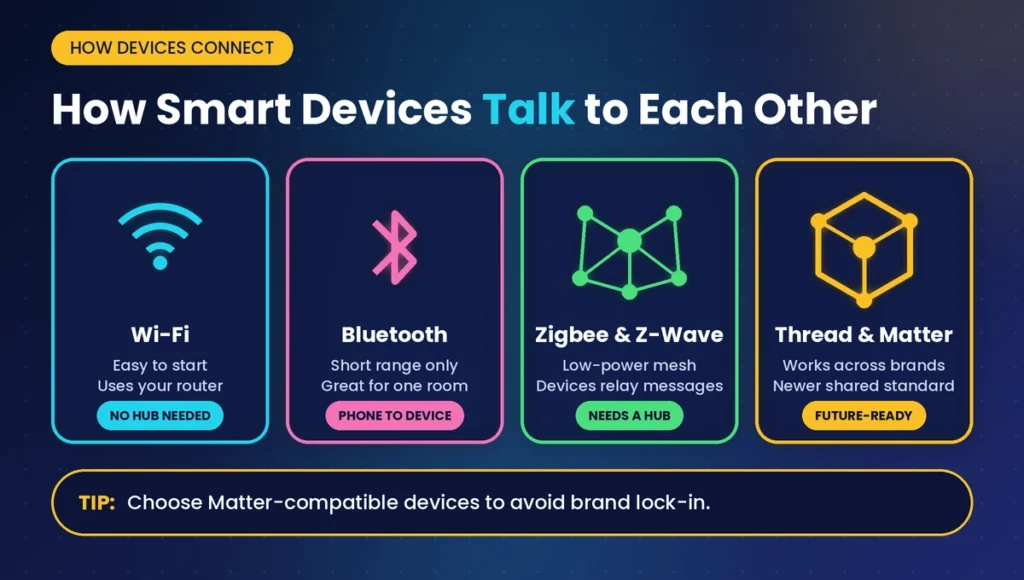
This is the part that confuses most people, and it is where most beginners waste money. Devices speak different “languages,” called protocols.
Wi-Fi
Wi-Fi is easy because you already have it. But every Wi-Fi device uses part of your router’s capacity. Fifty devices on one router can slow things down.
Bluetooth
Bluetooth works only at short range. It is fine for a single lock or a lamp in one room, but weak for whole-house control.
Zigbee and Z-Wave
These are low-power mesh networks. Each device passes messages along to the next one, so coverage grows as you add more devices. They usually need a hub or gateway. They are great for sensors and switches because they sip power.
Thread and Matter
Matter is a newer shared standard, designed so devices from different brands work together. Thread is a low-power network that Matter devices can use. If you are buying today, choosing Matter-compatible products is a smart way to avoid getting stuck with one brand.
Quick comparison
| Protocol | Needs a hub? | Best for | Main weakness |
| Wi-Fi | Usually no | Cameras, plugs, easy starts | Can crowd your router |
| Bluetooth | No | One-room devices | Short range |
| Zigbee / Z-Wave | Yes | Sensors, switches, big homes | Extra hub cost |
| Thread / Matter | Often a compatible hub | Mixing brands | Newer, fewer products |
How to Start: A Simple 5-Step Plan
Step 1: Write Down Your Real Problems
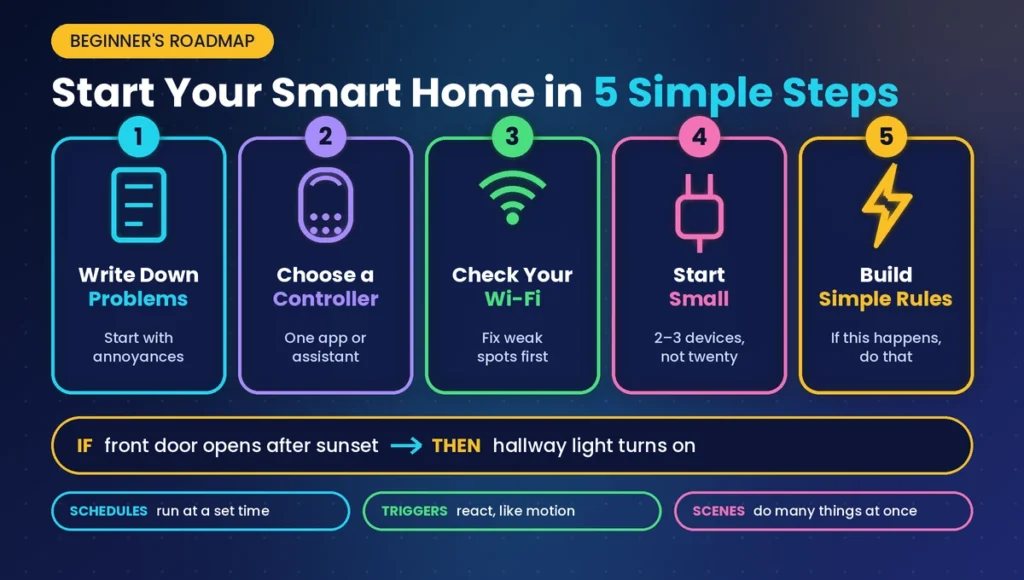
Do not start with products. Start with annoyances. Do you forget to switch off lights? Do you worry about the door? Is your electricity bill too high? Your problem tells you what to buy.
Step 2: Choose Your Controller
Pick one main app or assistant, such as Alexa, Google Home or Apple Home, and check that every device supports it. Mixing too many apps is the number one reason people give up.
Step 3: Check Your Wi-Fi
Test the signal in the rooms where devices will live. If the signal is weak, fix that first with a better router position or a mesh system. Smart devices cannot work well on poor Wi-Fi.
Step 4: Start Small
Buy two or three devices, not twenty. A smart plug, a motion sensor and a smart bulb are a safe test. Use them for a few weeks and learn what you actually enjoy.
Step 5: Build Simple Rules
Automation follows a pattern: if this happens, do that. For example, if the front door opens after sunset, turn on the hallway light. Three types of rules cover most homes:
- Schedules run at a set time.
- Triggers react to something, like motion.
- Scenes do several things at once, like “movie night” dimming lights and closing blinds.
Problems People Face (and How to Fix Them)
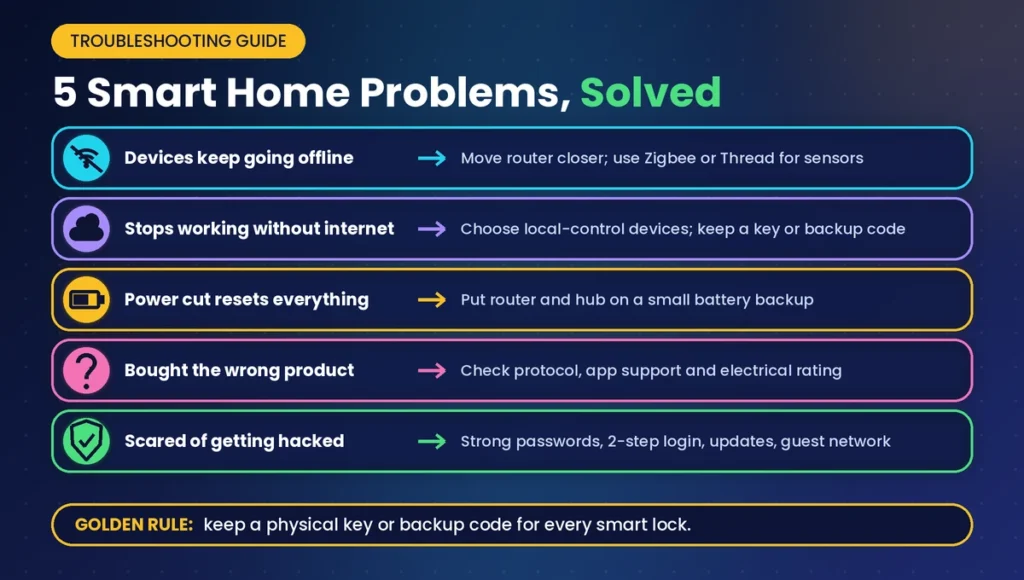
“My Devices Keep Going Offline”
The usual cause is weak Wi-Fi or an overloaded router. Move the router closer, reduce the number of Wi-Fi gadgets, or switch sensors to Zigbee or Thread.
“It Stops Working When the Internet Goes Down”
Many devices depend on the cloud, which means a company’s servers. If you want things to keep working during an outage, choose devices that support local control, and make sure important items like door locks still have a physical key or backup code.
“The Power Goes Out and Everything Resets”
Place your router and hub on a small battery backup. Most smart devices save their settings, but the network itself must stay alive.
“I Bought the Wrong Product”
Check three things before buying: the protocol, the supported app or assistant, and the electrical rating. Wall switches also need to fit your wall box, so measure first.
“I Am Scared of Getting Hacked”
That is a fair worry. Any device that connects to the internet can be a target, but good habits reduce the risk a lot.
Easy security habits
- Use a long, unique password for your Wi-Fi and every smart device account.
- Turn on two-step login wherever it is offered.
- Install updates as soon as they appear.
- Put smart devices on a separate guest network if your router allows it.
- Rename the router and change its default password.
- Avoid no-name products with no update history or privacy policy.
How Much Do Smart Home Automation Devices Cost?
Costs depend on where you live and which brands you pick, so think in tiers instead of exact prices:
- Starter: a few plugs or bulbs and a voice speaker. This is enough to learn the basics.
- Comfort: smart switches, sensors and a hub, so rooms react on their own.
- Full home: locks, cameras, climate control and wall panels, often with professional installation.
Smart products cost more than ordinary ones at the start, but they can reduce waste. Scheduling a water heater, cutting off standby power and turning off forgotten lights add up over time. Savings are real, but they are rarely dramatic, so buy for convenience and safety first.
When to Call an Electrician
Plugging in a smart plug is safe for anyone. Replacing wall switches is different because it involves your home’s wiring. If you are not sure what you are doing, hire a qualified electrician. It is not worth risking a shock or a fire to save a small fee.
Frequently Asked Questions (FAQs)
What are the best smart home automation devices for beginners?
Start with smart plugs, smart bulbs and a motion sensor. They are affordable, easy to install, and show you how automation works. Add door sensors or a smart lock later, once you know which daily problems you want solved.
Do smart home automation devices need Wi-Fi to work?
Not always. Wi-Fi devices do, but Zigbee, Z-Wave and Thread devices talk through their own small network and a hub. Even then, remote control from outside your home usually needs an internet connection.
Are smart home automation devices safe from hackers?
They can be targeted, like any connected device. You can lower the risk with strong unique passwords, two-step login, regular updates and a separate network for smart gadgets. Choose brands that keep updating their products.
Can I mix smart home automation devices from different brands?
Yes, if they share a standard. Matter-compatible devices are built to work across brands. Otherwise, check that each product supports the same assistant or app before buying, so you do not end up juggling several.
Will smart home automation devices save me money?
Often a little. Schedules, motion lighting and energy-monitoring plugs reduce wasted power. Do not expect huge savings, though. Treat comfort, safety and peace of mind as the main rewards.
What happens to my smart home automation devices when the internet goes down?
Cloud-dependent devices may stop responding to your phone. Devices with local control keep running schedules and rules. Keep a physical backup for important items, like a key for a smart lock.
Final Thoughts
Smart home automation devices are not about showing off. They solve everyday problems: forgotten lights, worried mornings, wasted energy and hard-to-reach switches. Begin with one real problem, choose one controller, pick compatible products, and protect your network from day one. Start small, learn what you enjoy, and grow step by step. A smart home that fits your life beats one stuffed with gadgets you never use.