Best Gaming Laptop in 2026: Top Picks
Finding the best gaming laptop is tricky because every brand says its machine is the fastest. The truth is simple: the right laptop depends on what you play, how much…
Finding the best gaming laptop is tricky because every brand says its machine is the fastest. The truth is simple: the right laptop depends on what you play, how much you can spend, and where you play. In this guide, you’ll learn which parts really matter, what to expect at each price level, and which mistakes waste your money.
What Makes a Gaming Laptop “Best”? (The 5 Parts That Matter)
Many buyers stare at the brand name. Smart buyers look inside. Here are the parts that decide how well a laptop actually plays games.
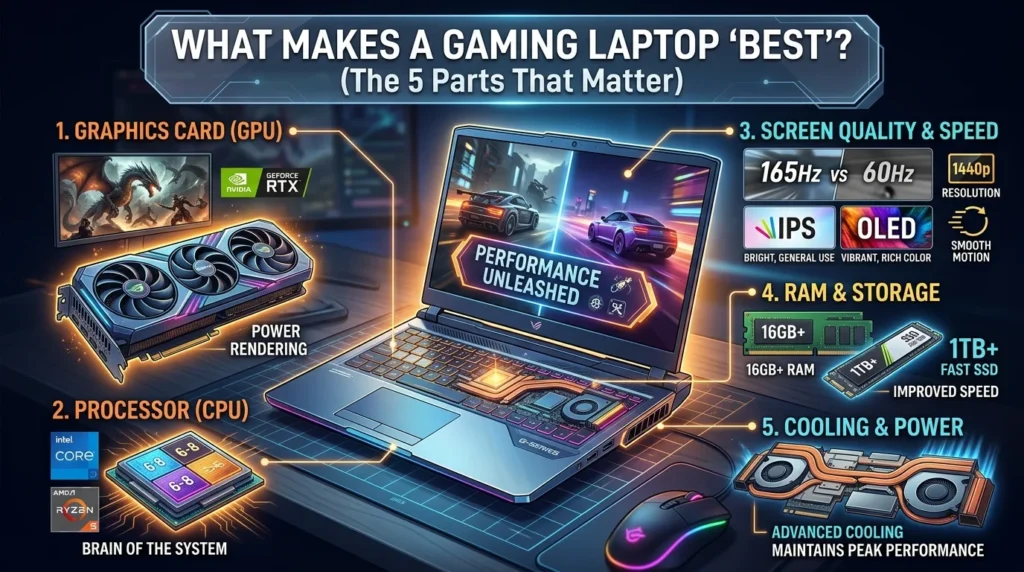
1. The Graphics Card (GPU) Is the Boss
The graphics card draws the pictures on your screen, so it matters more than anything else. Think of it as the engine of a car. A weak engine can’t be fixed by a fancy paint job.
How to read GPU names
Nvidia’s newer laptop cards use names like RTX 5050, 5060, 5070, 5080 and 5090. Higher numbers usually mean more power and a higher price. Always compare two laptops with the same GPU tier, because the same card can run faster or slower depending on how much power the maker allows it to use.
2. The Processor (CPU)
The CPU handles game logic, background apps and streaming software. A modern Intel Core or AMD Ryzen chip with at least 6 to 8 cores is a solid base for gaming. Going higher helps if you edit videos or stream.
3. Screen Quality and Speed
A gaming laptop with high refresh rate feels smoother because the picture updates more times each second. A 60Hz screen updates 60 times per second. A 144Hz or 165Hz screen updates over twice as often, so fast games like shooters feel much more responsive.
Which screen type should you choose?
- IPS panels: bright, affordable and great for most players.
- OLED panels: deep blacks and rich colors, but they cost more.
- Resolution: 1080p is the sweet spot for budget builds, while 1440p looks sharper if your GPU can handle it.
4. Memory (RAM) and Storage
Choose 16GB of RAM as the minimum. If you also stream or run many apps at once, 32GB is safer. For storage, a 1TB SSD is a smart pick because modern games are huge, and many take up over 100GB.
5. Cooling and Power
Gaming laptops get hot. If the cooling is weak, the laptop slows itself down to stay safe, and your fancy GPU never reaches its full speed. Look for reviews that test performance after 30 minutes of play, not just the first few minutes.
Best Gaming Laptop by Budget
Prices change often because of sales and new releases, so treat these as ranges, not exact numbers.
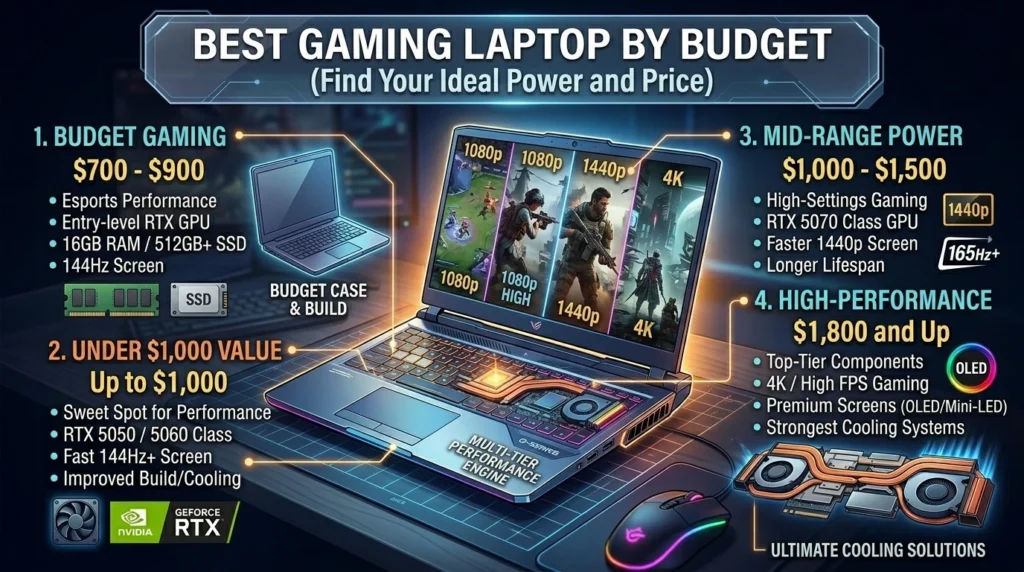
Best Budget Gaming Laptop: About $700 to $900
The best budget gaming laptop should give you smooth play in popular esports games without breaking your wallet. At this level, expect an entry-level RTX GPU, 16GB of RAM and a 144Hz screen. Compromises usually show up in the screen brightness and the plastic body.
Best Gaming Laptop Under $1,000
The best gaming laptop under $1,000 is where most students and first-time buyers should start. Sales can bring RTX 5050 or RTX 5060 class machines close to or under this line. Check three things: a 144Hz or faster screen, 16GB of RAM, and a decent cooling system. Skip any laptop that hides its GPU power rating.
Mid-Range Pick: About $1,000 to $1,500
This is the best-value zone. You can find RTX 5070 class laptops with fast screens and better cooling. These handle new games at high settings and last longer before feeling outdated.
High-Performance Gaming Laptop: $1,800 and Up
A high-performance gaming laptop uses top-tier GPUs, premium screens and stronger cooling. Models like the Razer Blade and the Asus ROG Zephyrus lines are popular in this class. They are great for 1440p and 4K play, but they cost much more, and the thickest ones are heavy to carry.
Best Gaming Laptop for 1080p Gaming
If you want the best gaming laptop for 1080p gaming, you don’t need a monster. A 1080p screen has fewer pixels than 1440p or 4K, so even mid-range GPUs can reach high frame rates. An RTX 5050 or 5060 laptop with a 144Hz screen is enough for most players. Spend the extra money on a better screen or more storage, not on a GPU you can’t use.
Best Gaming Laptop for Gaming and Streaming
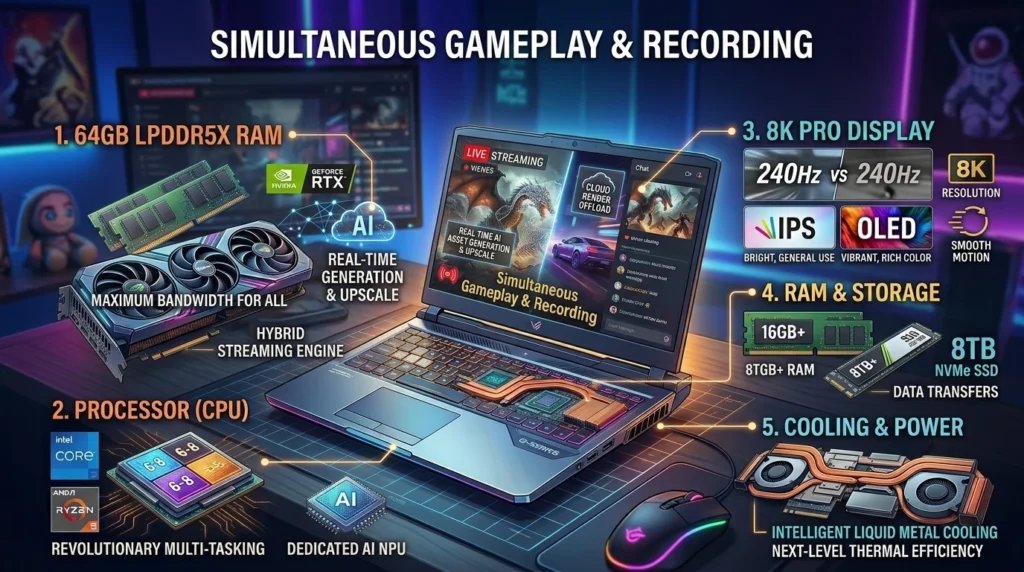
Streaming asks your laptop to play a game, record it and send video to the internet at once. The best gaming laptop for gaming and streaming needs more than raw speed.
What to look for
- 32GB of RAM so the game and streaming app don’t fight for memory.
- A strong multi-core CPU to handle streaming tasks.
- An Nvidia GPU with a built-in video encoder, which takes pressure off the processor.
- Good Wi-Fi or an Ethernet port so your stream doesn’t lag.
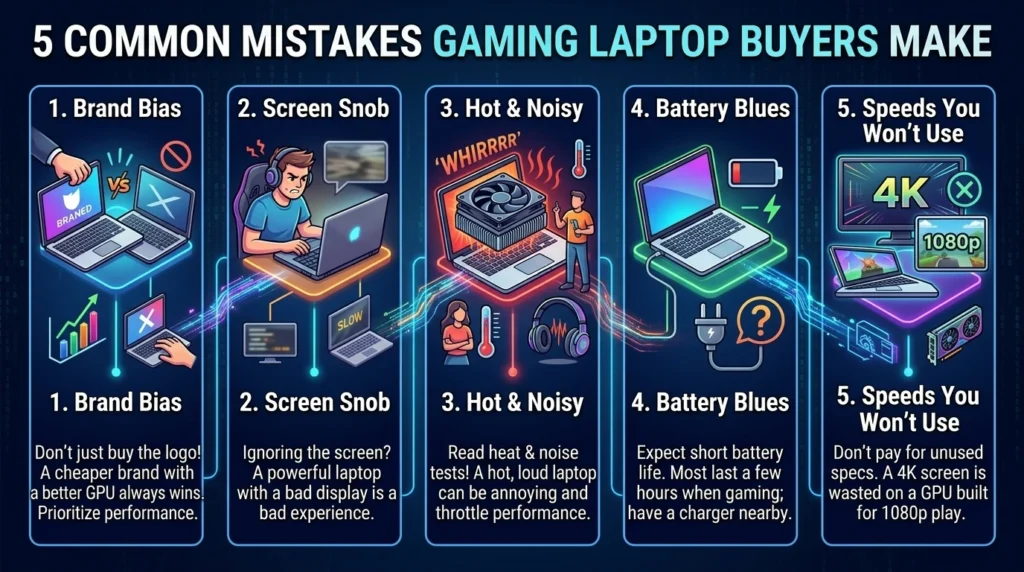
5 Common Mistakes Buyers Make
- Buying only because of the brand. A cheaper brand with a better GPU can beat a famous brand with a weaker one.
- Ignoring the screen. A powerful laptop with a slow, dim screen feels worse than it should.
- Forgetting about heat and noise. Read tests that measure loudness and temperature.
- Expecting great battery life. Most gaming laptops last only a few hours when gaming, so plan to plug in.
- Paying for specs you won’t use. A 4K display is wasted on a GPU built for 1080p play.
Quick Buying Checklist
Before you click “buy,” make sure you can answer yes to these:
- Does it have at least 16GB RAM?
- Is the SSD 512GB or larger, ideally 1TB?
- Does it offer a 144Hz or higher screen?
- Do reviews show it stays cool during long sessions?
- Can you return it or claim a warranty easily?
Frequently Asked Questions: Best Gaming Laptop
What is the best gaming laptop for beginners?
Choose a mid-range model with an RTX 5050 or 5060 GPU, 16GB RAM and a 144Hz screen. This setup runs most popular games smoothly and costs far less than premium laptops, making it the best gaming laptop for new players.
Is a gaming laptop with high refresh rate worth it?
Yes, especially for fast games. A 144Hz or higher screen shows motion more smoothly than 60Hz, making aiming and reaction easier. Your GPU must produce enough frames per second to use it, so don’t pair a fast screen with a weak card.
Can I find the best gaming laptop under $1,000?
Yes. Look for an RTX 5050 or 5060 class GPU, 16GB RAM and a 144Hz display. Watch sales, since prices drop often. Avoid models with only 8GB of RAM or very low screen brightness.
How much RAM do I need for gaming and streaming?
Aim for 32GB if you stream while gaming. Sixteen gigabytes can work for gaming alone, but streaming software uses extra memory. More RAM keeps your game, browser and streaming app running without stuttering.
Is a 1080p screen enough for gaming?
Yes. For most mid-range laptops, 1080p is the best match because the GPU can reach high frame rates. A 1440p screen looks sharper but needs a stronger graphics card, which raises the price.
How long does a gaming laptop last?
Most gaming laptops stay useful for about three to five years. Good cooling, a strong GPU and keeping dust out help it last longer. Newer games get heavier over time, so you may lower settings later.
Is a best gaming laptop better than a gaming desktop?
Desktops give more power for the money and are easier to upgrade. Laptops win on portability and all-in-one convenience. Choose a laptop if you move around, and a desktop if you stay at one desk.
How do I choose a gaming laptop for AAA games?
Choose a gaming laptop with a capable dedicated GPU, at least 16GB RAM, an SSD, and effective cooling. For demanding AAA games, compare independent benchmarks at your preferred resolution and graphics settings. Consider 32GB RAM for demanding workloads, and check VRAM requirements for specific titles. A powerful GPU paired with a good display and cooling system generally provides a better experience than choosing a laptop based on brand alone.
Do gaming laptops have good battery life?
Gaming laptops generally have limited battery life during gaming because their processors and graphics cards consume considerable power. Battery life during everyday tasks, such as browsing or document editing, can be considerably better. Actual results depend on battery capacity, screen brightness, power settings, and hardware. If you travel frequently, compare independent battery tests and choose a model with a suitable battery capacity.
What is the difference between a gaming laptop and a regular laptop?
Gaming laptops typically feature dedicated graphics cards, stronger cooling systems, and high-refresh-rate displays for demanding games. Regular laptops usually prioritize portability, affordability, and battery life, making them suitable for browsing, studying, and office tasks. Gaming laptops are also useful for video editing and other graphics-intensive work, but they tend to be heavier and more expensive.
Which gaming laptop brand is the most reliable?
No single gaming laptop brand is the most reliable in every situation. ASUS ROG, Lenovo Legion, Acer Predator, HP OMEN, and Dell Alienware offer gaming models across different price ranges. Reliability depends on the specific model, cooling design, build quality, and after-sales support. Before buying, compare independent reviews, warranty coverage, repair availability, and customer feedback for the exact laptop you are considering.
Final Thoughts: Choosing the Best Gaming Laptop
The best gaming laptop is the one that matches your games, your screen needs and your budget, not the one with the highest price tag. Start with the GPU, add a fast screen and enough RAM, and check how well it handles heat. If you’re on a tight budget, a smart pick under $1,000 can play today’s games well. If you want power for gaming and streaming, aim higher and prioritize cooling and memory. Use the checklist above, compare real tests, and you’ll end up with a laptop you enjoy for years.