AI Character Consistency Tools: 5 Best Picks Compared
You make a great hero in one image. Then you ask for the same hero on a bus, and suddenly the face, hair and jacket all look different. If that…
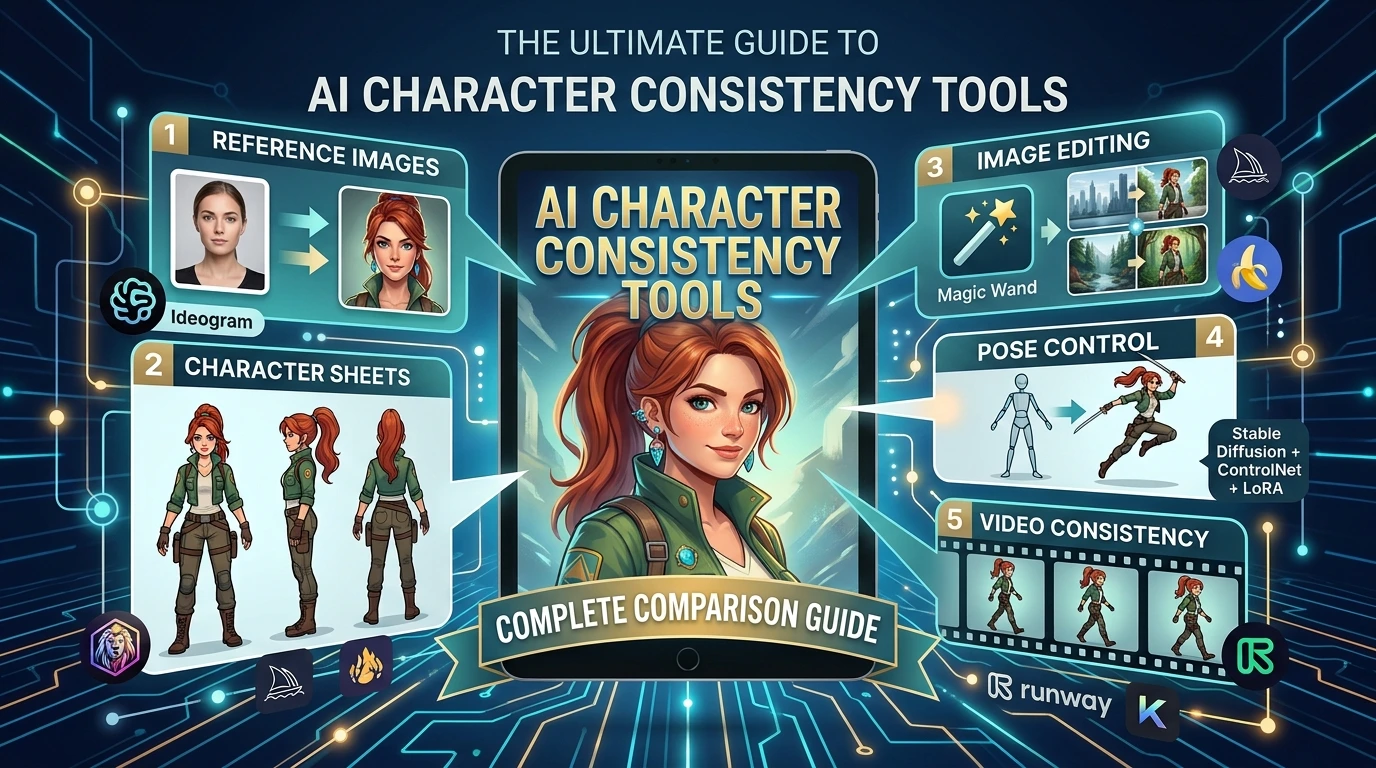
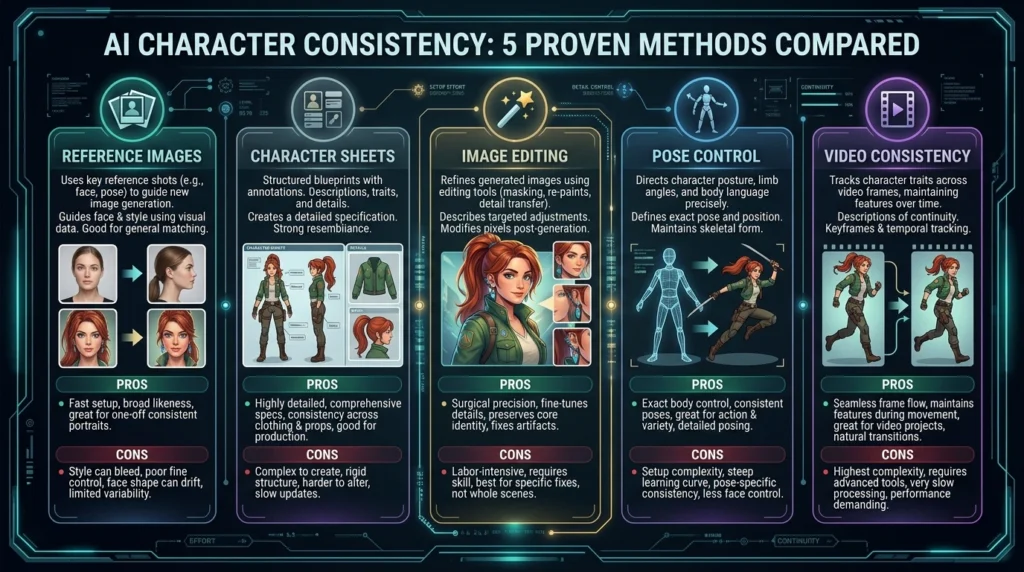
You make a great hero in one image. Then you ask for the same hero on a bus, and suddenly the face, hair and jacket all look different. If that sounds familiar, you are not alone. Choosing the right AI character consistency tools is the fix, and this guide shows you which ones work best, what each one is good at, and where each one fails. We compare five methods: reference images, character sheets, image editing, pose control and video consistency.
Why AI Keeps Changing Your Character
Most image generators start from random noise every time you press generate. A text prompt like “a girl with red hair and a green coat” leaves a lot of blanks. The AI fills those blanks differently each time, so the nose, eye shape, hair length or jacket details drift.
Think of it like asking ten people to draw “a dog” from a one-line description. You would get ten different dogs. Consistency tools give the AI something to look at instead of guessing.
The Three Things That Must Stay the Same
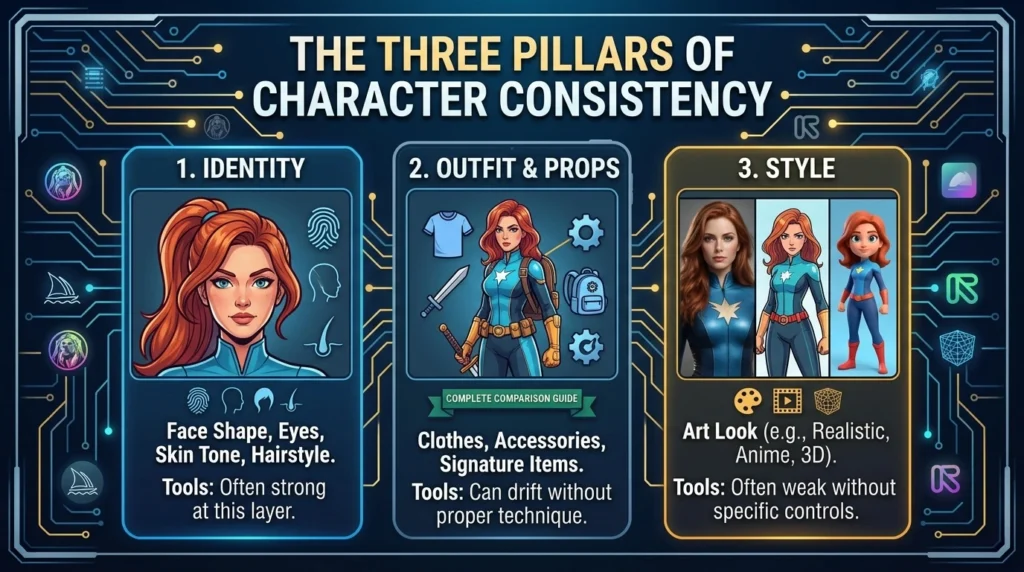
A character is more than a face. To feel like the same person, three layers need to match:
- Identity: face shape, eyes, skin tone, hairstyle
- Outfit and props: clothes, accessories, a signature backpack or sword
- Style: the same art look, such as anime, 3D cartoon or realistic photo
Most tools are strong at the first layer and weaker at the other two. Keep this in mind when you compare options below.
The 5 Methods Compared at a Glance
| Method | Best for | Main weakness |
| Reference images | Fast results from one photo or drawing | Outfit and style can still drift |
| Character sheets | Cartoons, comics and mascots | Takes setup time |
| Image editing | Small changes without losing the face | Hard to build brand-new scenes |
| Pose control | Exact body positions | Needs extra tools and learning |
| Video consistency | Moving characters | Costs more and fails on long clips |
Method 1: Reference Images (The Fastest Starting Point)
With this method you upload one or more pictures of your character, then describe a new scene. The tool copies the identity from your picture into the new image.
Tools That Do This Well
- Ideogram: Its character feature is built around reference photos, and the newer model accepts several reference images at once. It is strong on realistic faces, but its API currently takes only one reference image, so check this before planning an app around it.
- Midjourney: Uses reference tags that guide a character or an object. It gives beautiful art, but you must learn its settings.
- Leonardo: Offers a character reference option that works well for stylized art.
- Google’s Nano Banana (Gemini image editing): Can blend several uploaded images and keep the person recognizable, which helps when you want your character with a pet or product.
Tips That Make References Work Better
Use clear, well-lit photos
A sharp face with soft light gives the AI more to learn from than a dark selfie.
Give two or three angles
Front, side and three-quarter views help the tool understand the whole head, not just one side. This is the idea behind a multi angle AI character generator, and it reduces strange faces in profile shots.
Reuse the same references every time
Switching reference images between scenes is the most common reason a character looks different.
Method 2: Character Sheets (Best for Cartoons, Comics and Mascots)
A character sheet is one image that shows your character from the front, side and back, plus a few expressions and the outfit. You create it once, then use it as your reference for everything else. Professional animation studios do this on paper, and it works just as well with AI.
How to Build a Simple Sheet
- Generate your character on a plain white background.
- Ask for a turnaround view: front, side, back.
- Add a row of expressions: happy, angry, surprised.
- Save the sheet and upload it with every new prompt.
Why Comic Makers Love It
An AI comic book character generator needs the hero to look identical across dozens of panels. Sheets lock in the outfit and proportions, which a single reference photo cannot do. Some platforms, such as ConsistentCharacterAI, include reference-sheet tools built for anime and storybooks. Treat marketing claims of “perfect” results carefully, because even that site admits results are not guaranteed to be identical.
Method 3: Image Editing (Change the Scene, Keep the Face)
Instead of generating a new picture, you edit an existing one. You can swap the background, change the outfit or add an object while the rest stays untouched. Ideogram’s face swap and Magic Fill, Photoshop’s generative tools and Nano Banana style editing all work this way.
When to Choose Editing
- You already have a perfect image and only need small changes.
- You want the same face in a very specific scene.
- You need to fix one mistake, such as extra fingers.
The trade-off is creativity. Editing is safe but limited, so many creators use references for new scenes and editing for repairs. This pairing is a handy kind of AI illustration continuity tool workflow.
Method 4: Pose Control (Exact Bodies, Exact Actions)
Sometimes the face is fine but the body is wrong. Pose control lets you draw a stick figure or upload a pose picture so the AI follows it.
ControlNet and Similar Tools
Open tools like Stable Diffusion with ControlNet or Flux-based setups let you set poses, depth and outlines. Hosted platforms increasingly add simple pose options too. Pose control is slower to learn, but it is the best answer when you need a character to hold a sword at the exact same angle in three panels.
LoRA Model Training for Consistent AI Characters
If you want the strongest identity lock, LoRA model training for consistent AI characters is the advanced route. You train a small add-on model using roughly 15 to 30 images of your character. After training, the character appears reliably in many styles and poses. It needs more effort and a capable computer or a paid cloud service, so it suits game studios and long series, not beginners.
Method 5: Video Consistency (The Hardest Test)
Video multiplies the problem, because the face must stay stable across many frames. Today most tools animate a still image, which keeps the starting face better than text-only video. Platforms such as Runway, Kling and similar tools accept an image as the first frame or a reference. Results are best for clips of a few seconds. Longer videos still drift, so plan your story in short shots and reuse the same source image.
Top 7 AI Character Consistency Tools Compared
Here are the seven tools worth testing first, side by side. Pick by what you are making, not by hype.
| Tool | Best for | How it keeps the character | Video support | Starting cost (USD, approx.) |
| Ideogram | Realistic faces and headshots | Reference images (1 to 5 in the newest model), face swap, character mask | No | Free weekly credits, then paid plans |
| Midjourney | Artistic, stylish scenes | Reference tags for characters and objects | Yes (short clips) | About $10 per month |
| Leonardo | Stylized art and game concepts | Character reference option | Yes (image to motion) | Free daily credits, paid plans from about $10 per month |
| Google Nano Banana (Gemini) | Editing and mixing several images | Multi-image editing that keeps the person recognizable | No (separate video tools) | Free with limits, or about $0.04 per image through the API |
| Flux Kontext | Precise edits that keep the face | In-context editing from one image | No | Roughly $0.04 per image on hosted services |
| Stable Diffusion + ControlNet + LoRA | Full control, long series and comics | Pose control plus trained character models | Via add-ons | Free software, but you need a capable computer or cloud GPU |
| ConsistentCharacterAI | Storybooks, anime and quick batches | Single-photo reference, batch generation, reference sheets | Yes (credit-based) | $5 for 10 credits; larger packs cost less per credit |
Prices change often and are approximate, so confirm them on each tool’s pricing page before you pay.
A simple rule: start with Ideogram or Leonardo for easy results, use Nano Banana or Flux Kontext when you want to edit an image you already like, and move to Stable Diffusion only when you need a full AI comic book character generator workflow with exact poses.
The Best AI Character Consistency Tools, Explained
The table gives you the quick view. Here is why each tool earns its spot, plus three extra options for specific jobs.
- Ideogram: The easiest place to start. Upload a clear photo, describe a new scene, and the face usually stays the same. Great for headshots and branded characters.
- Midjourney: Famous for beautiful, artistic images. It takes more practice to learn, but it is a favorite for stylish scenes and concept art.
- Leonardo: A friendly choice for game art and stylized characters. The free daily credits let you test before paying.
- Google Nano Banana (Gemini): Strong at mixing several photos into one scene. Handy when your character needs to appear next to a pet, product or another person.
- Flux Kontext: Made for editing. Give it one image and ask for a change, and it tries to keep everything else the same.
- Stable Diffusion with ControlNet and LoRA: The power-user option. It gives the most control over poses and identity, and it is the best match for LoRA model training for consistent AI characters, but it takes time to learn.
- ConsistentCharacterAI: Built around storybooks, anime and batch creation. Its reference-sheet tools suit AI illustration continuity tools workflows, though no tool can promise perfect results.
- Runway: A leading choice when you want your character to move. You feed it a still image and it builds a short video clip from it.
- Kling: Another popular image-to-video tool. Use your best character image as the starting frame and keep clips short.
- Scenario: Aimed at game studios. It lets teams train custom character models so every asset matches the same look.
If your character must look right from every side, pair any of these with a multi angle AI character generator step: create front, side and back views first, then reuse them as references.
Tools and features change quickly. Test with a free plan and one character before you commit.
So Which Tool Should You Pick?
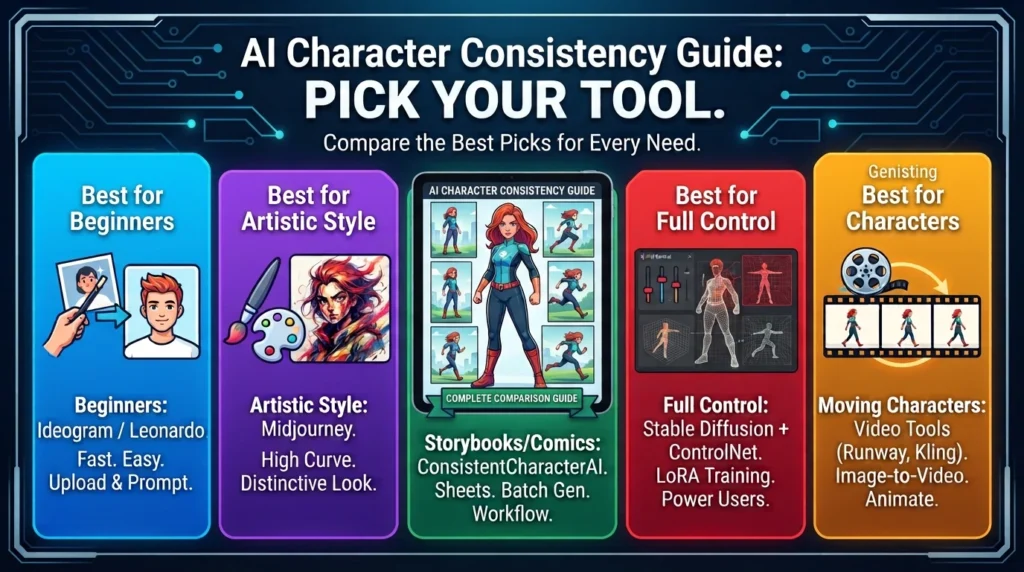
Best for Beginners
Ideogram or Leonardo. Upload a reference, write a prompt, done.
Best for Artistic Style
Midjourney. Great visuals, more of a learning curve.
Best for Storybooks and Comics
A character sheet workflow plus a tool with batch generation, such as ConsistentCharacterAI, whose credit packs start around $5 for 10 credits.
Best for Full Control
Stable Diffusion or Flux with ControlNet and LoRA training. Free software, but you need time and hardware.
Best for Moving Characters
An image-to-video tool fed with your best still frame.
Prices change often, and many tools charge about $10 to $30 a month for regular use, so check each pricing page before you commit.
Common Mistakes (and Quick Fixes)
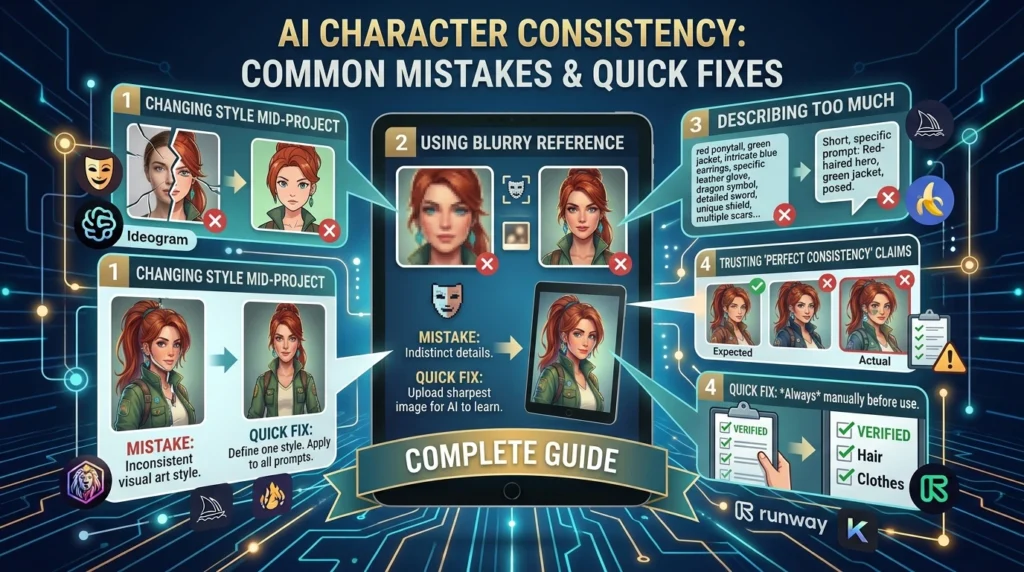
- Changing the style mid-project. Pick one style and keep it in every prompt.
- Using a blurry reference. Upload the sharpest image you have.
- Describing too much. Keep prompts short and change only one thing at a time.
- Ignoring privacy. Read how a tool stores uploaded photos, and only upload images you own or have permission to use.
- Trusting “perfect consistency” claims. Always review face, hair and clothes before publishing.
Frequently Asked Questions (FAQs) About AI Character Consistency Tools
What are AI character consistency tools?
They are generators and add-ons that keep one character looking the same across many images. They use reference photos, character sheets, editing or trained models so the face, outfit and style do not change from scene to scene.
How many photos do I need to keep a character consistent?
One clear photo can work in many tools, but two to five from different angles is safer. Training a LoRA model usually needs around 15 to 30 images for strong, repeatable results.
Which of the AI character consistency tools is best for beginners?
Ideogram and Leonardo are easy starting points because you upload a reference and type a prompt. Mid journey gives stylish results but takes longer to learn. Start free, test one character, then upgrade.
Can I keep multiple characters consistent in one scene?
Yes, but it is harder. Use a separate reference for each character, keep prompts simple, and edit problem areas afterward. Some tools struggle when two faces appear together, so expect a few retries.
Do character sheets really help?
Yes. A sheet shows front, side and back views, so the AI sees the whole design. Comic and storybook creators use sheets because they hold outfits and proportions steady better than one photo.
Can AI keep a character consistent in video?
Partly. Starting from one strong still image works best, and short clips of a few seconds hold up well. Longer videos can drift, so build your story from short shots.
Are AI character consistency tools free?
Most offer limited free credits, then charge. Expect small credit packs from about $5 or monthly plans in the $10 to $30 range. Open-source tools are free but need your own computer.
Can I use my AI characters commercially?
Often yes on paid plans, but rules differ by tool. Read the terms, and make sure you have rights to any photo or character you upload.
Final Thoughts
There is no single winner among AI character consistency tools. References are the fastest start, character sheets suit comics and mascots, editing protects a good image, pose control fixes body problems, and LoRA training gives the strongest lock for long projects. Video is improving but still works best in short clips. Pick one method, test it with a single character, and expand once it works. With a small plan and the right tool, your hero can look like the same hero on every page.