Free AI Meeting Note Taker: Honest 2026 Comparison
You join a meeting, you try to listen, you try to type, and by the end you remember almost nothing. That is the exact problem a free AI meeting note…
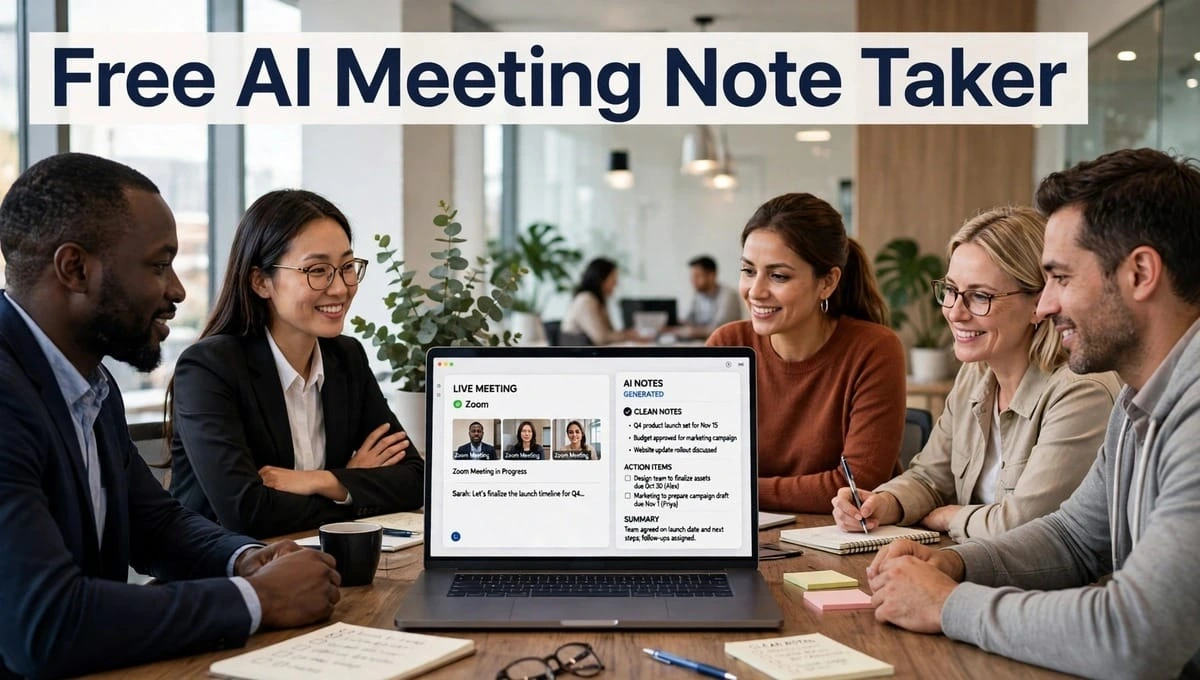
You join a meeting, you try to listen, you try to type, and by the end you remember almost nothing. That is the exact problem a free AI meeting note taker is supposed to solve.
But here is the truth most landing pages will not tell you: “free” does not mean the same thing everywhere. One tool gives you 3 minutes. One gives you 1 meeting. One gives you 10 meetings. If you pick the wrong one, you will lose your notes in the middle of an important call.
I compared the best free tools with the same real test a 45-minute meeting, 3 people, some interruptions, some accents, some background noise so you can pick in 5 minutes instead of wasting 5 days testing them yourself.
What Is A Free AI Meeting Note Taker?
A Simple Explanation For Beginners
Think of it like a smart friend who sits in the meeting, never gets tired, and at the end says: “Here is what you decided, here is who has to do what, and here is the full transcript if you want to check.”
A good tool does 3 jobs:
- Records the meeting
- Transcribes it into text
- Summarizes it into action items
Most tools call this automatic meeting transcription software. The best ones also work as an AI meeting summary generator, so you don’t have to read 10 pages of transcript.
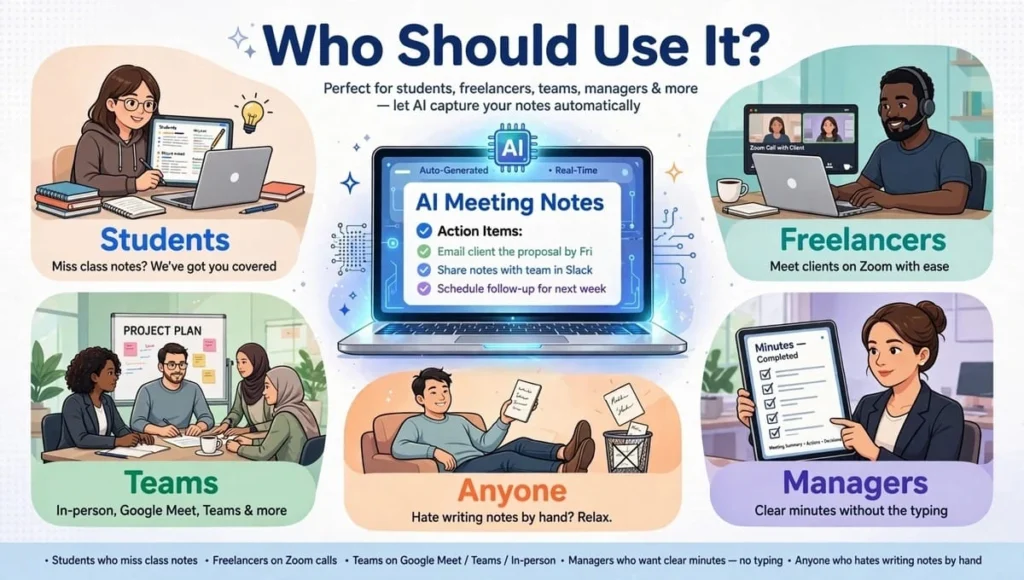
Who Should Use It?
- Students who miss class notes
- Freelancers who meet clients on Zoom
- Teams who meet on Google Meet, Teams, or in-person
- Managers who want clear minutes without typing
- Anyone who hates writing notes by hand
If you only have 1-2 meetings a week, a free plan can be enough. If you have meetings every day, you will hit the limit very fast.
Quick Comparison: Best Free AI Meeting Note Taker In 2026
Before we go deep, here is the honest answer in one table.
| Tool | What “Free” Really Means | Bot? | Best For |
| Scribbl | 10 meetings / month, no length limit | No bot | Google Meet, privacy |
| Fathom | Unlimited recordings, 5 AI summaries / month | Bot joins | Best overall free |
| Fireflies.ai | 800 min storage, unlimited transcription | Bot joins | Teams, long history |
| Otter.ai | 300 min / month, 30 min per meeting | Bot joins | Students, lectures |
| Granola | Unlimited meetings, no bot | No bot | Mac users, in-person |
| Read AI | 5 meetings / month, 60 min each | Bot joins | Quick summaries |
| Notta | 120 min / month, only 3 min per recording | Bot joins | 58 languages |
| Meeting.ai | Only 1st meeting free | Bot or phone | In-person + decks |
| Meet | Geek5 meetings / month | Bot joins | Small teams |
| tl;dv | Unlimited meetings, 25 AI summaries | Bot joins | Highlight clips |
Short answer: If you want the best free AI meeting assistant for most people, start with Fathom or Scribbl. If you want no bot, pick Scribbl or Granola. If you want to keep old meetings forever, pick Fireflies.
1. Transcription Limits: Where Free Plans Trick You
This is the most important part. Do not skip it.
Scribbl – 10 Meetings, No Length Limit
Scribbl gives you 10 meetings a month. Each meeting can be 30 minutes or 2 hours, it does not matter. You get full transcript, AI notes, action items, and video.
Good for: Real 45-90 minute meetings on Google Meet.
Limit: 11th meeting is not free. Video expires after 2 months on free plan.
Fathom – Unlimited Recordings
Fathom is the most generous free plan in 2026. You can record unlimited meetings. You get unlimited transcription. You only get 5 AI summaries per month for free, but you still get the full transcript for all meetings.
Good for: People who have meetings every day.
Limit: Only 5 free AI summaries per month. After that, you have to write your own summary from transcript.
Fireflies.ai – 800 Minutes Storage
Fireflies gives you unlimited transcription but only 800 minutes of storage. That means you can record a lot, but old meetings get deleted when storage is full.
Good for: Teams who want to search old meetings.
Limit: Storage limit, not minute limit.
Otter.ai – 300 Minutes, 30 Minutes Per Meeting
Otter is famous for students. You get 300 minutes per month, but each meeting can only be 30 minutes on free plan. A 1-hour lecture will be cut in half.
Good for: Short classes, short interviews.
Limit: 30-minute cap per meeting.
Granola – Unlimited, No Bot
Granola is different. It does not use a bot. It runs on your Mac and takes notes while you are in the meeting. You get unlimited meetings on free plan.
Good for: Mac users, in-person meetings, private calls.
Limit: Only works on Mac. No Windows, no Android app for free.
Notta – 120 Minutes That Are Not Real
Notta says 120 minutes free. But each recording is only 3 minutes. A 45-minute meeting gives you only 3 minutes of text. The rest is gone.
Good for: Testing your language in a 2-minute voice note.
Limit: Unusable for a real meeting on free plan.
Meeting.ai – Only 1 Meeting Free
Meeting.ai gives you your first full meeting free. After that, you pay with coins. Each meeting costs coins, and new users get confused about how many coins a 1-hour meeting needs.
Good for: Testing one full meeting with decks and docs.
Limit: Not a real free plan for weekly use.
Winner For Transcription Limits: Fathom + Scribbl
Fathom wins for unlimited recordings. Scribbl wins for unlimited length. Pick Fathom if you have many meetings, Scribbl if you have long meetings.
2. Summaries: Which Tool Actually Understands You?
A transcript is just words. A summary is understanding.
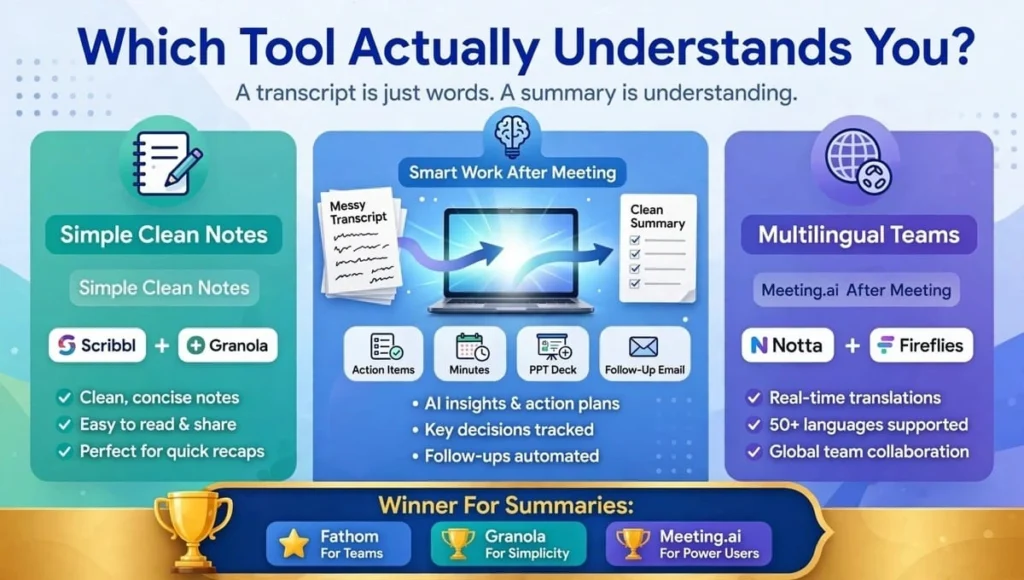
Best For Simple, Clean Notes: Scribbl + Granola
Scribbl gives you: AI notes, action items, transcript with speaker names. Clean, simple, easy to share.
Granola gives you: Beautiful notes that look like a human wrote them. It mixes your own typed notes + AI notes together. Perfect for students and founders.
Best For Smart Work After Meeting: Meeting.ai + Fathom
Meeting.ai is more than an AI meeting summary generator. It makes:
- Meeting minutes
- A Visual Note
- A PPTX deck
- A follow-up email
Fathom is great for sales and teams. It highlights the exact moment someone said “Yes, let’s do it” and lets you share that clip.
Best For Multilingual Teams: Notta + Fireflies
Notta supports 58 languages. If your team speaks Japanese, Spanish, Chinese, and English in the same week, Notta is strong.
Fireflies supports 30+ languages and is good for searching old meetings in different languages.
Winner For Summaries: Fathom For Teams, Granola For Simplicity, Meeting.ai For Power Users
If you want finished work, pick Meeting.ai. If you want clean notes fast, pick Granola or Scribbl.
3. Integrations: Does It Work With Zoom, Teams, And Your Tools?
You need an AI meeting recorder for Zoom and Teams that fits your normal day, not a tool that forces you to change how you meet.
For Google Meet Users: Scribbl
Scribbl works through a Chrome extension. No bot joins. No one asks “Who is this bot?” It works even if you are not the host, even on a free Gmail account. It saves to Google Drive and lets you ask ChatGPT or Claude about your meeting.
For Zoom + Teams Users: Fathom, Fireflies, Otter
These three are made for Zoom and Teams. They join via calendar, auto-record, and send notes to Slack, Notion, HubSpot, Salesforce.
Fathom has the best Zoom integration. Fireflies has the best search. Otter has the best live captions.
For In-Person Meetings: Granola + Meeting.ai
No Zoom? No problem. Put your laptop or phone on the table.
Granola records from your Mac with no bot. Meeting.ai records from your phone with no bot. Both are best for classroom, office, or coffee-shop meetings.
For Large Companies: Notta + MeetGeek
Notta connects to Zapier, CRM, and calendar. MeetGeek connects to 10,000+ apps. Good if your company already uses many tools.
Winner For Integrations: Fathom For Zoom/Teams, Scribbl For Meet, Granola For In-Person
There is no one winner. Pick based on where you meet most.
4. Free-Plan Restrictions You Must Know Before You Trust It
This is where most people get angry later.
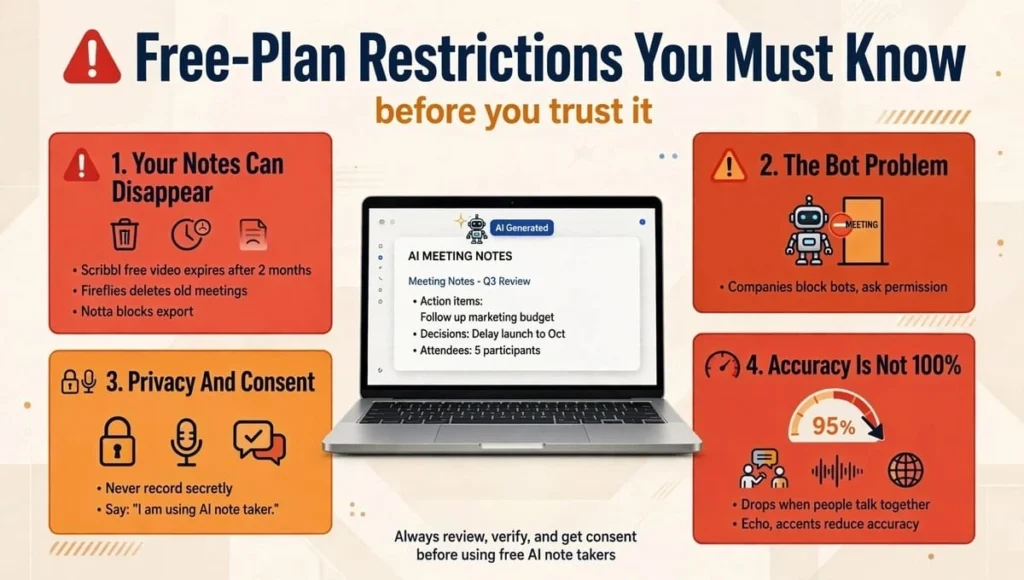
1. Your Notes Can Disappear
Scribbl free video expires after 2 months. Fireflies free deletes old meetings when storage is full. Notta free blocks export. Rule: Download your important notes on the same day.
2. The Bot Problem
Many companies now block bots. If a bot joins your client’s meeting without permission, it looks unprofessional. Scribbl and Granola solve this by using no bot. Meeting.ai solves it by recording from your phone. Others use a bot by default. Always ask permission first.
3. Privacy And Consent
Never record secretly. In many countries and companies, it is illegal to record without telling people. Say this at the start: “I am using an AI note taker for action items, is that okay?” Also, do not upload meetings about salary, health, or company secrets without checking the privacy policy.
4. Accuracy Is Not 100%
All tools claim 95% to 98% accuracy. In real life, accuracy drops when two people talk at the same time, audio echoes, or people use technical words or strong accents. Always check action items before sending to your boss or client.
Which Tool Should YOU Pick? (Decision Guide)
Don’t pick the loudest tool. Pick the tool that matches your life.
- You are a student? Pick Otter or Scribbl. Otter for short lectures, Scribbl for long Google Meet classes.
- You have meetings every day on Zoom? Pick Fathom. Unlimited recordings, best free plan.
- You care about privacy and hate bots? Pick Scribbl or Granola. No bot joins your call.
- You use Mac only? Pick Granola. It feels like magic.
- You meet in-person a lot? Pick Granola or Meeting.ai. Phone on table, no bot.
- You work in many languages? Pick Notta Pro, not free. Free plan is too limited.
- You want finished decks and emails? Test Meeting.ai’s one free meeting.
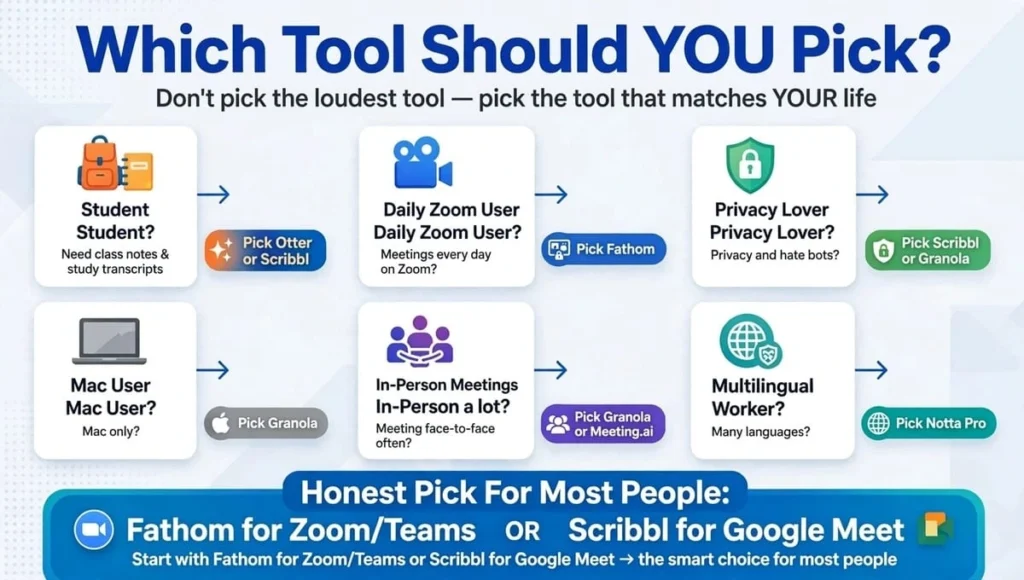
My Honest Pick For Most People: Start with Fathom for Zoom/Teams or Scribbl for Google Meet. Both are truly free, both let you finish a real meeting, and both are trusted by thousands of teams.
FAQs – Free AI Meeting Note Taker
What is the best free AI meeting note taker in 2026?
Fathom is best for unlimited recordings. Scribbl is best for no-bot Google Meet. Granola is best for Mac users. Pick based on where you meet most.
Is there a free AI meeting note taker that works for a full meeting?
Yes. Scribbl gives 10 full meetings, Fathom gives unlimited recordings, Granola gives unlimited meetings. Notta only gives 3 minutes per recording.
Which free AI meeting note taker is best for Zoom and Teams?
Fathom, Fireflies, and Otter are best for Zoom and Teams. They auto-join from calendar and send notes to Slack and Notion. Scribbl needs Desktop app for Zoom and Teams.
Can I use a free AI meeting note taker without a bot joining?
Yes. Scribbl uses a Chrome extension with no bot. Granola runs on your Mac with no bot. Meeting.ai lets you record from your phone with no bot.
Does an AI meeting recorder for Zoom and Teams work on phone?
Meeting.ai works best on phone. Scribbl and Granola work best on laptop. Fathom and Fireflies work on phone via their apps but need a bot.
Is it legal to use automatic meeting transcription software?
Yes, if you tell everyone you are recording and get consent. Always announce it at the start. Do not record secretly, especially in HR or sensitive meetings.
How accurate is an AI meeting summary generator?
In a quiet meeting with one speaker at a time, it is 95%+ accurate. Accuracy drops with overlapping speech, poor audio, accents, or technical jargon. Always review action items.
What is the best free AI meeting assistant for students?
Scribbl and Otter are best for students. Scribbl has no length limit for Google Meet. Otter has live captions for lectures. Both save notes to Google Drive.
Will my free meeting notes disappear?
Yes, sometimes. Scribbl videos expire after 2 months. Fireflies deletes old meetings when storage is full. Always download your transcript on the same day.
Why was I charged after a free trial?
Most trials need a card and auto-charge when trial ends. Set a reminder to cancel one day before. Check if the tool charges weekly, monthly, or yearly before you start.
Does a free AI meeting note taker work for in-person meetings?
Yes. Granola and Meeting.ai are best for in-person meetings. Put your phone or laptop on the table. Scribbl and Fathom are mainly for online meetings.
Can I get action items automatically?
Yes. All tools create action items. Fathom highlights key moments. Meeting.ai also creates decks and follow-up emails. Always check names and dates before sharing.
Final Verdict: Don’t Choose The Loudest Tool, Choose The Right Free Plan
A free AI meeting note taker should save you time, not create stress about limits, bots, or hidden charges.
If you remember only one thing from this article, remember this: Check what “free” really means before your important meeting. Notta will stop after 3 minutes. Meeting.ai will stop after 1 meeting. Fathom, Scribbl, and Granola will let you finish a real meeting for free.
Start with the tool that matches your meetings. Test it on a small, unimportant meeting first. Check the summary, check the action items, and check if your team is comfortable with a bot or no-bot setup.
When you find the right one, you will never go back to typing notes by hand. Your meetings will be shorter, your follow-ups will be clearer, and you will finally be able to actually listen instead of just writing.